
Chat that already knows about the call
One script tag on your site, or an SDK inside your app. The same agent that answers your QR codes, your support inbox and your phone number answers here — with the same knowledge, the same rules and the same memory of the customer. When it needs a person, a person joins the thread.
An answer, not a menu of departments
The customer types the way they would type to a person — half in Arabic, half in English, with the order number dropped into the middle of the sentence. The agent reads it, checks what it knows, and answers. If the answer requires an action and you have allowed that action, it takes it.
- Emirati and Gulf dialect in text, including code-switching mid-sentence.
- Right-to-left throughout when the customer writes in Arabic, not a mirrored afterthought.
- Answers from your knowledge base, so the reply matches your policy page instead of guessing.
- Can do things — check an order, start a return, book a callback — for the systems you connect.
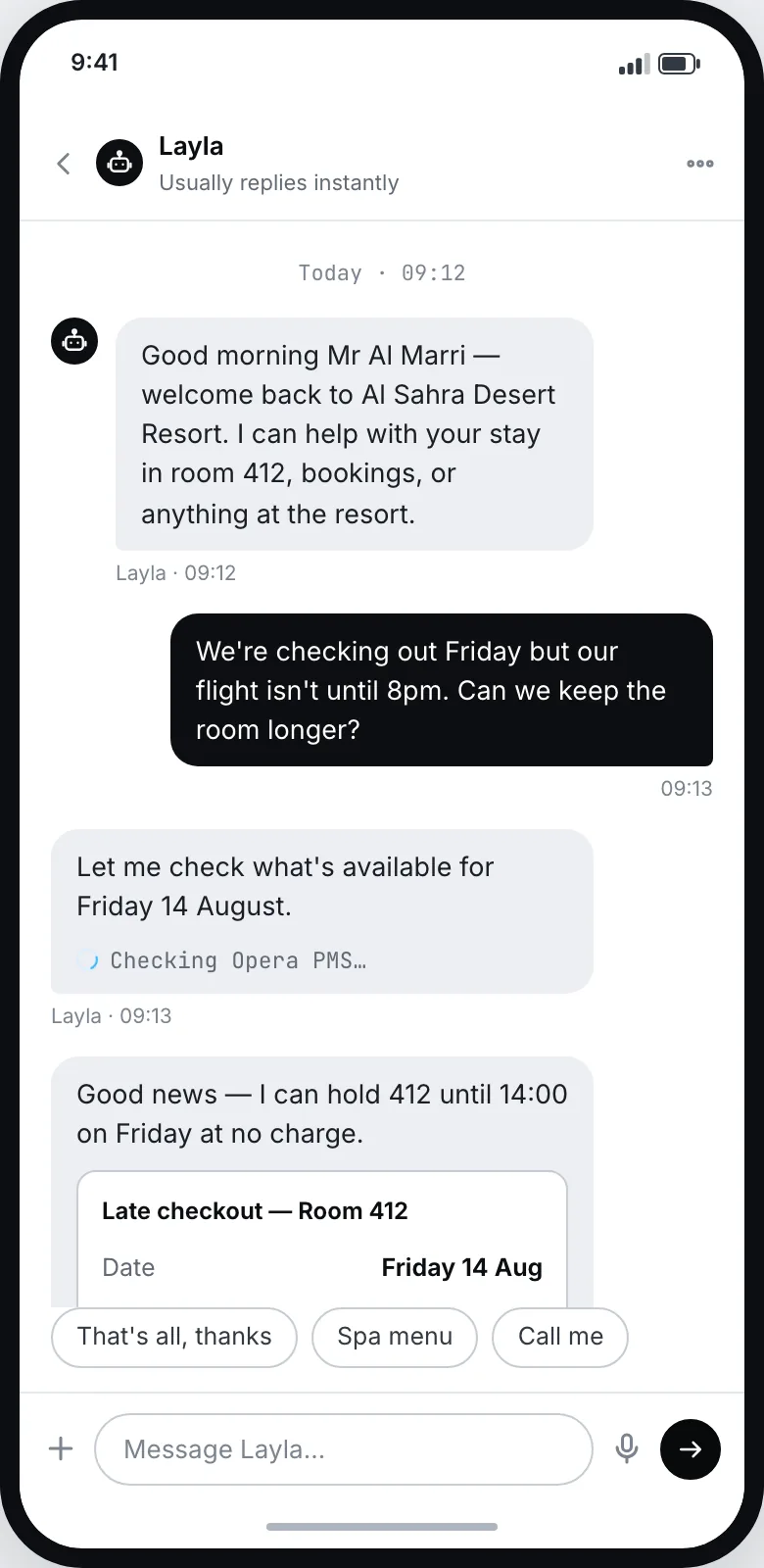
What the widget does without you building it
None of this is a plugin, an add-on or a second subscription. It is what the channel is, the moment you paste the tag.
One thread across channels
Someone who called yesterday opens chat today and carries on from where they stopped. No re-explaining, no reference number to quote.
Human takeover in place
Your agent joins the conversation the customer is already in. The customer sees a person arrive, not a new window and a new greeting.
Arabic and English
Reads and writes Emirati and Gulf dialect, and follows the customer if they switch language halfway through a sentence.
How Arabic worksAnswers from your knowledge base
The same knowledge base behind QR, email and phone, built from your website and editable in the console at any time.
About the knowledge baseWorkflows behind the reply
A chat can update a record, send a confirmation or open a ticket after it ends — without anyone copying anything anywhere.
See the workflow builderData stays in the region
Conversations and transcripts are resident in the UAE region by default, and you decide what is retained and for how long.
How data is handledOne tag on the page, or the SDK in your app
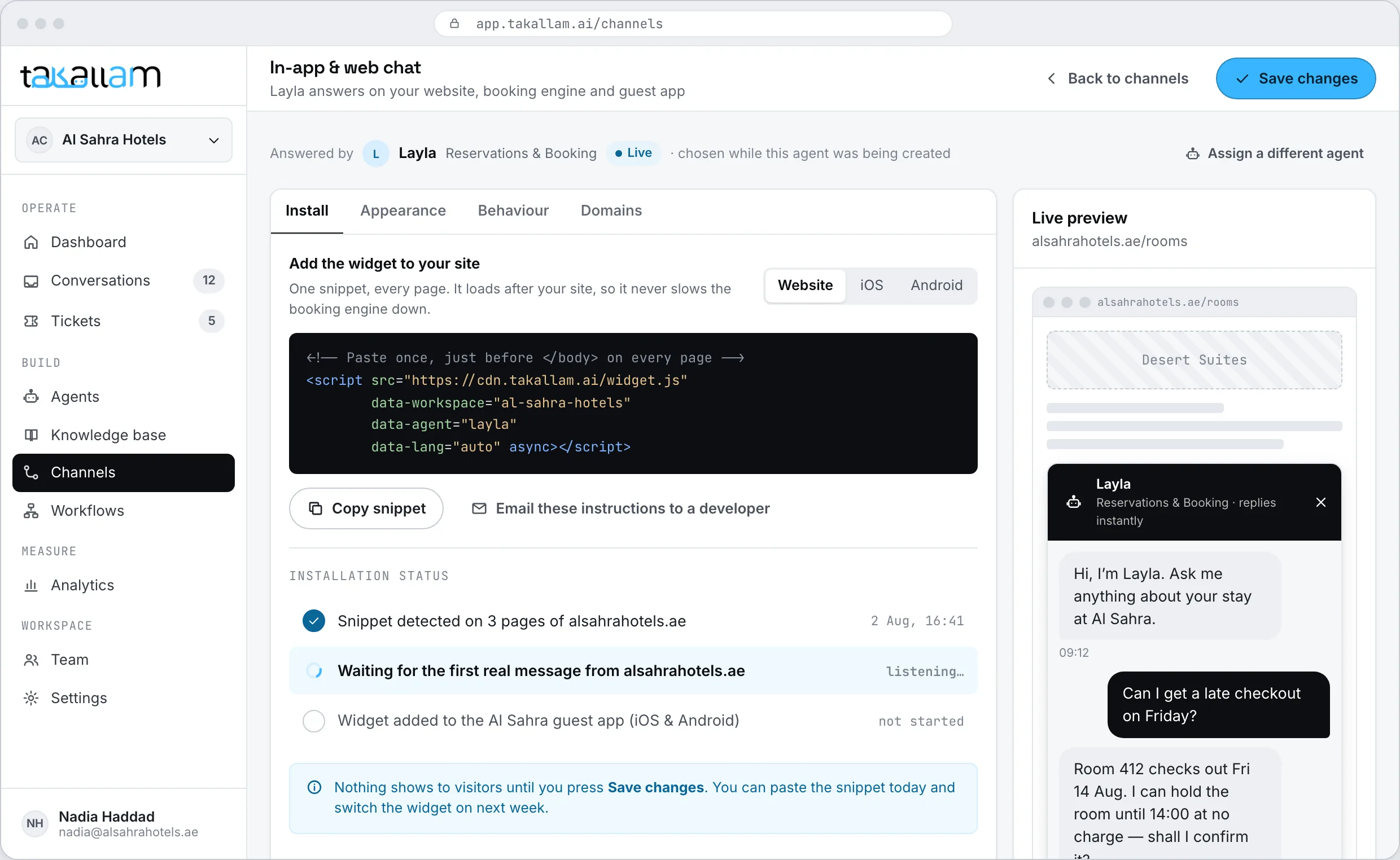
The web embed is a single script tag naming the agent that should answer. If you have a mobile app, the SDK opens the same conversation inside it, so a customer who moves between your site and your app is not starting over.
- Web embed: one tag, no build step, nothing to compile.
- iOS and Android SDKs for chat inside your own app.
- Identify a signed-in customer so the thread follows them across channels.
- Everything the widget does is also available over the REST API.
<!-- Web: one tag, before the closing body tag -->
<script defer
  src="https://api.takallam.ai/v1/embed.js"
  data-agent="agt_reservations"></script>

<script>
  // Optional: identify a signed-in customer so the
  // thread follows them from phone or QR into chat
  Takallam.identify({
    customer_id: "cus_10482",
    locale: "ar-AE"
  });
</script>Configured in the console, not in your codebase
You choose which agent answers, what it opens with, and where the launcher sits. Change any of it later without touching the page again — the tag on your site stays exactly the same.
- Pick the agent, the greeting and the languages the widget opens in.
- Set when it should offer a person instead of answering.
- Run it on more than one site, each with its own agent.
- Test it against real questions before a customer ever sees it.
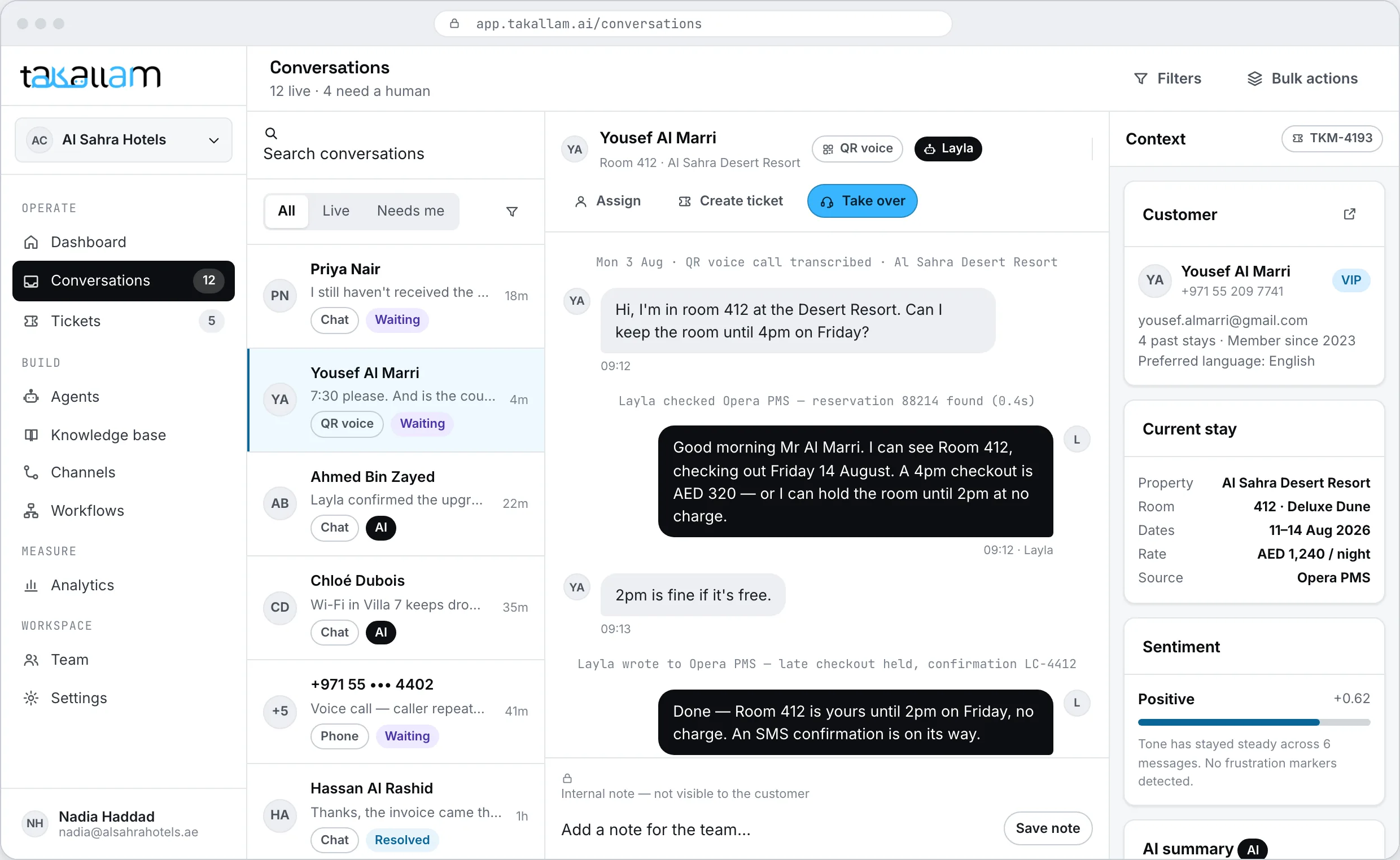
The conversation that started somewhere else
Chat is usually the second thing a customer tries. They scanned a code in the lobby, or called on the way in, and now they are messaging. Takallam keeps all of that as one history in one inbox, so nobody asks them to explain it again.
- QR voice, chat, email and phone land in the same queue, tagged by channel.
- A returning customer arrives with their previous conversations attached.
- Your team sees what the AI already tried before they type a word.
- Tickets and SLAs sit behind the queue for anything that needs tracking.
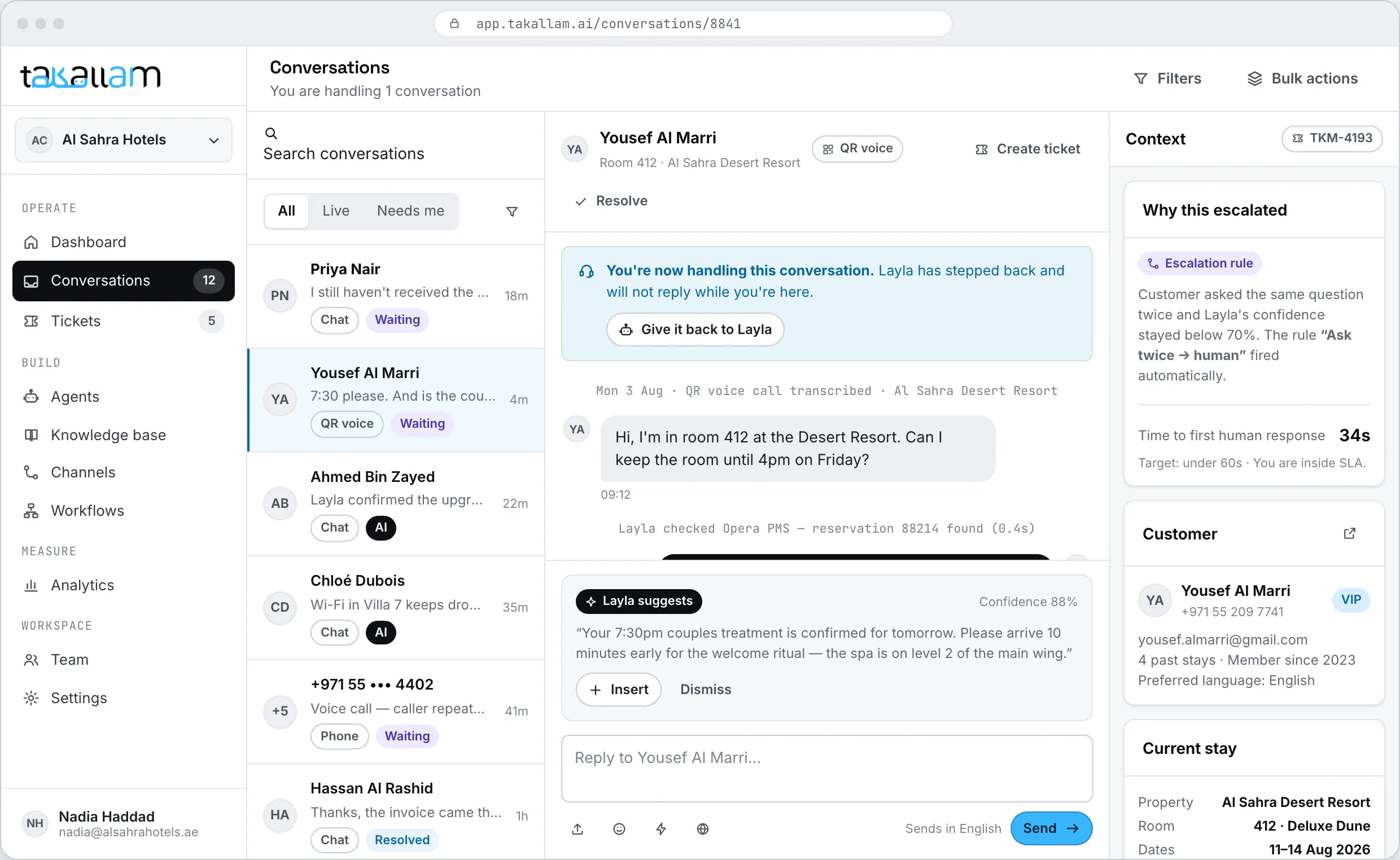
A person joins. The window does not change.
When the agent is unsure, when the customer asks for a human, or when the request is one you have not allowed the AI to fulfil, the conversation moves to your team in place. The customer keeps typing in the same box they were already typing in.
- No transfer, no ticket number to quote, no "someone will get back to you".
- Your agent opens the thread with the full transcript and what the AI attempted.
- Escalation rules you write, per agent and per channel.
- Hand it back to the AI when the hard part is over.
Not a decision tree wearing a chat skin
Scripted chatbots have real advantages: they are predictable, they never say anything you did not write, and for one short high-volume flow they do the job. A live-chat-only widget has the opposite strength — a real person reading tone. The gap is everything in between.
| Takallam chat | Scripted chatbot | Live chat only | |
|---|---|---|---|
| Answers a question nobody scripted | |||
| Answers at 3am | |||
| Knowledge built from your website | |||
| Emirati and Gulf dialect in text | Depends who is on shift | ||
| Continues a conversation from phone, email or QR | |||
| Human takeover in the same thread | |||
| Changing an answer | Edit the knowledge base | Rebuild the flow | Brief the team |
| Tickets, SLAs and a support queue | |||
| Takes an action, not just a reply | A person does it | ||
| Same agent on QR, email and phone |
Categories rather than named products — capabilities vary by vendor and plan. Named, sourced comparisons live on the comparison pages.
Same agent, three more places to reach it
Chat covers the customer who is already on your site or in your app. The other three channels cover the ones who are not.
QR voice
A printed code the customer scans and speaks to — on a door, a shelf edge or a delivery box. No app, no download, no queue.
See the QR channelForward [email protected], or connect the mailbox. The agent reads the whole thread and replies from your own address.
See the email channelPhone
A real inbound number — new, or the one already on your signage. It answers on the first ring, however many people call at once.
See the phone channelWhat people ask about the chat channel
How do I put Takallam chat on my website?
You paste one script tag before the closing body tag. The console gives you the tag with your agent already named in it, so there is nothing to configure in code and no build step.
Is there a mobile SDK?
Yes — iOS and Android SDKs put the same chat inside your own app, using the same agent, the same knowledge base and the same conversation history as the web embed.
Will the chat know about a call the customer made yesterday?
If the customer is identified, yes. Sign them in and pass their id, or let them arrive from a code, an email address or a number Takallam already recognises, and the previous conversations come with them. If they were anonymous on both channels, there is nothing to link them by.
Can someone on my team take over?
Yes, in the same thread. Your agent sees the full transcript and what the AI already tried, then continues typing to the customer. There is no transfer, no new window and no ticket number for the customer to repeat.
Does it handle Arabic properly?
Yes. It reads and writes Emirati and Gulf dialect rather than only Modern Standard Arabic, follows a customer who switches between Arabic and English mid-sentence, and lays out right-to-left throughout.
Can it do things, or only answer?
It can act on the systems you connect and the actions you allow — checking an order, starting a return, booking a callback. What happens after the conversation, like updating a record or sending a confirmation, is a workflow you build by dragging blocks.
Can we make it match our site?
The widget is configured from the console: which agent answers, what it opens with, where the launcher sits and which languages it starts in. You change it there and the tag on your page never has to be touched again.
How is chat priced?
You pay per interaction, and each channel is priced separately, because a chat message and a phone call do not cost the same to deliver. No per-seat licences and no minimum commitment. Takallam is pre-launch, so rates are being set with the first cohort — join the waitlist and we will quote against your real volume.
Put one tag on your site and see what it answers
We are onboarding a first cohort in the UAE now. Tell us which channels you need and we will come back with a rate against your real volume.
Pay per interaction · priced per channel · no seats, no minimums