
One inbox, and a ticket only when you need one
A QR scan in a hotel corridor, a chat on your website, an email to your support address, a call to your main number — all of it lands in the same queue. The AI handles what it can and flags what it cannot. Your team picks up inside the same conversation, with the whole transcript already there.
Four channels, one line of work
Most teams read voice in one tool, chat in another and email in a third. The same customer shows up three times and nobody has the whole story. In Takallam there is one inbox: calls, chats, email threads and QR conversations in the same list, with the same filters, the same search and the same history.
- A call at 9pm and a chat at 9am are one conversation record, not two strangers.
- Calls are transcribed, so you read a phone conversation the way you read a chat.
- An email thread sits in the same queue as a call, not in a separate helpdesk.
- Filter by channel, agent, language, status or SLA.
- Search across everything at once instead of once per vendor.
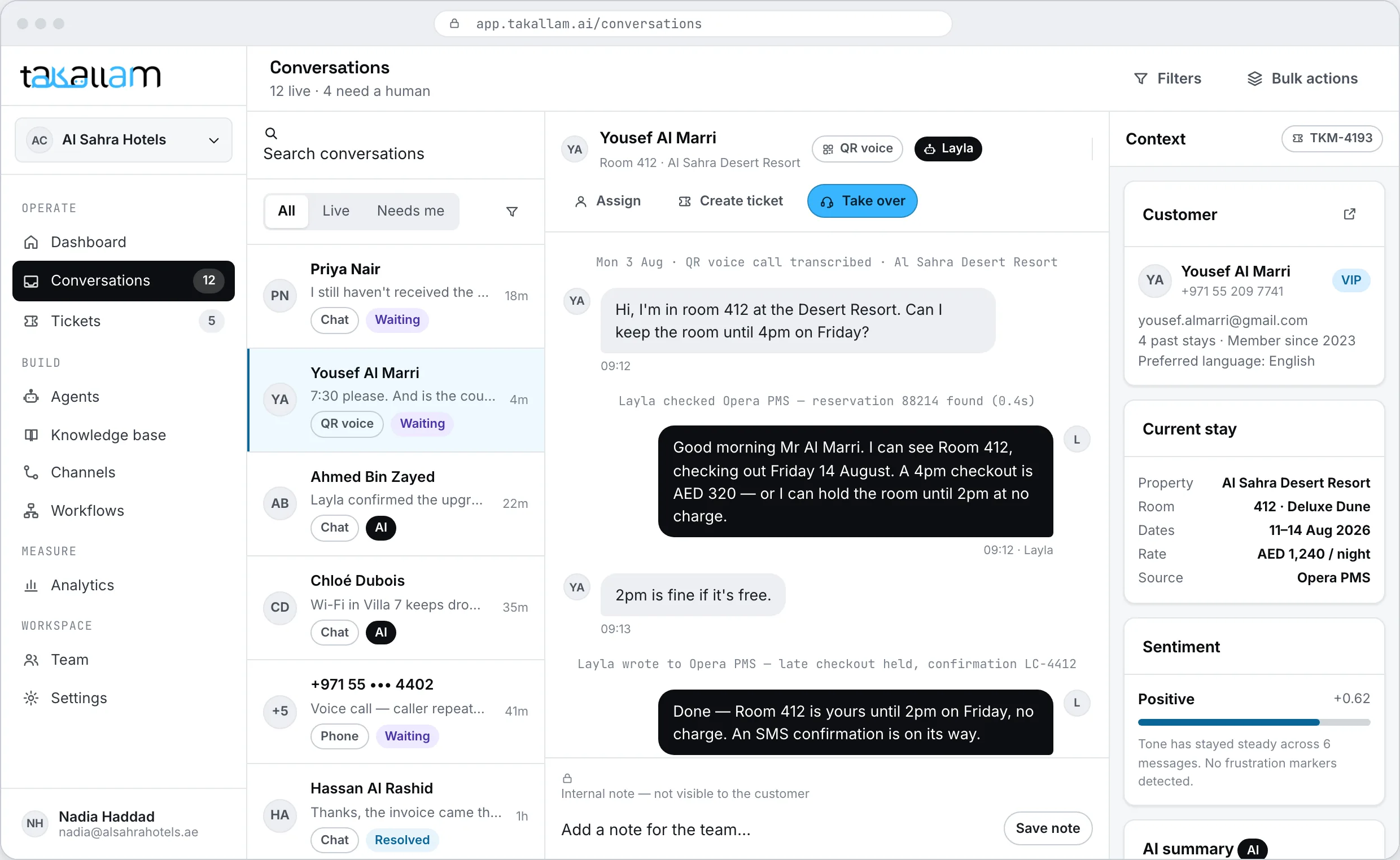
The console, in one list
Everything your team touches during a shift, in one place, with one login and no per-seat licence behind it.
The inbox
Every conversation from every channel — a call, a chat, a QR scan, an email thread — live as it happens, with the AI replies visible as they go out.
How email lands in the inboxNeeds a human
A separate queue for the conversations the AI flagged, ordered by how long they have been waiting rather than when they arrived.
Takeover
Step into the thread the AI was already in. The customer does not repeat themselves and does not get a new reference number.
Tickets and SLAs
For the work that outlives the conversation: an owner, a priority, a due time and a clock that is visible to everyone.
Knowledge base
What your agents know, editable, with every page and document they learned from listed and removable.
How knowledge is builtAnalytics
What customers ask, how much each channel resolves on its own, and where the AI escalates.
See conversation analyticsWhat a shift looks like on one screen
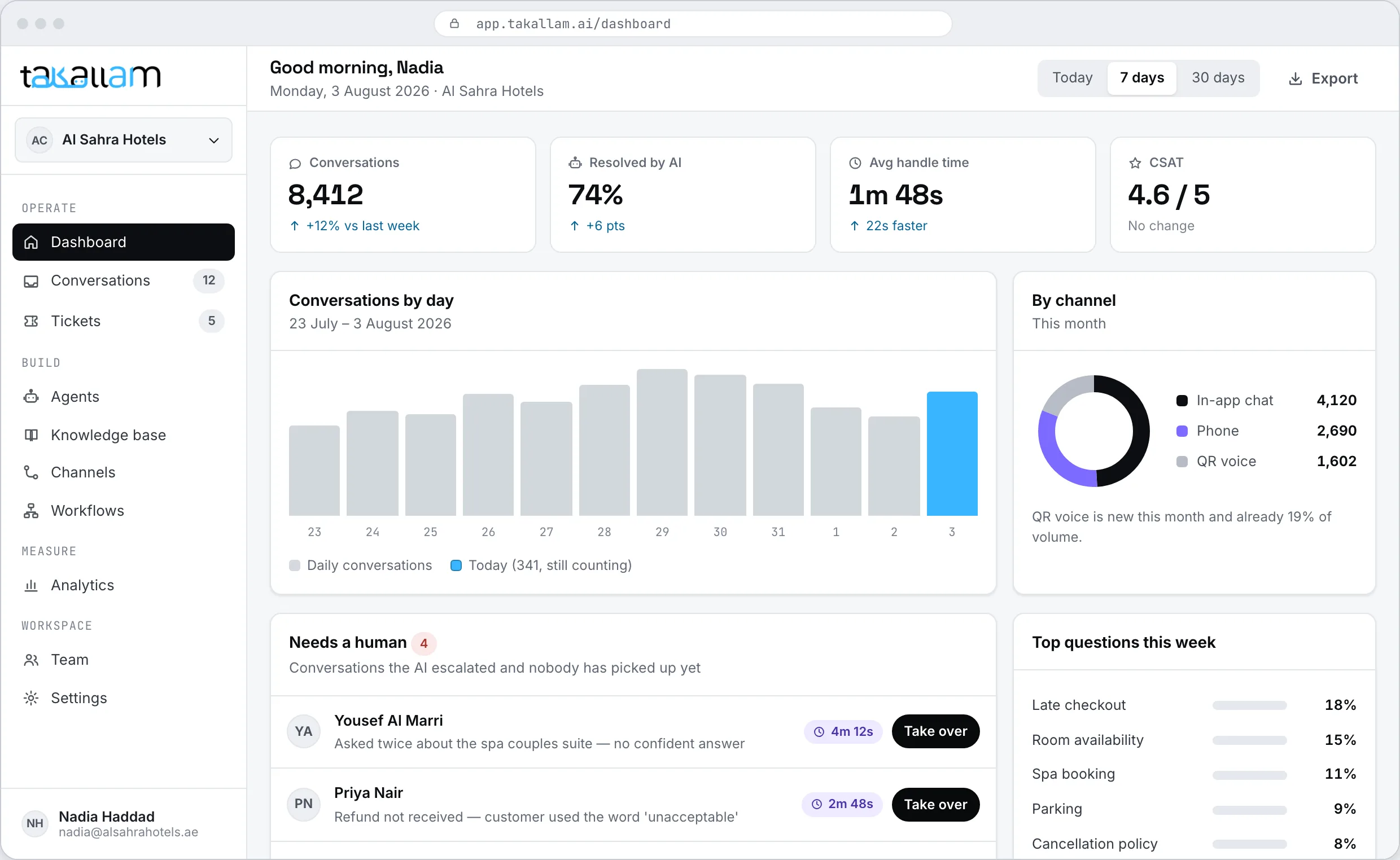
Volume by channel, how much is being resolved without a person, what is waiting for a human, and which conversations are closest to breaching an SLA. It is the screen a supervisor keeps open, not a report someone assembles on Sunday night.
- Live counts by channel and by agent, human and AI alike.
- The waiting queue is visible before a customer complains about it.
- Click any number and read the conversations behind it.
What happens when the AI cannot finish
Escalation is a normal part of the day, not a failure state. The point is that the customer never feels it happen.
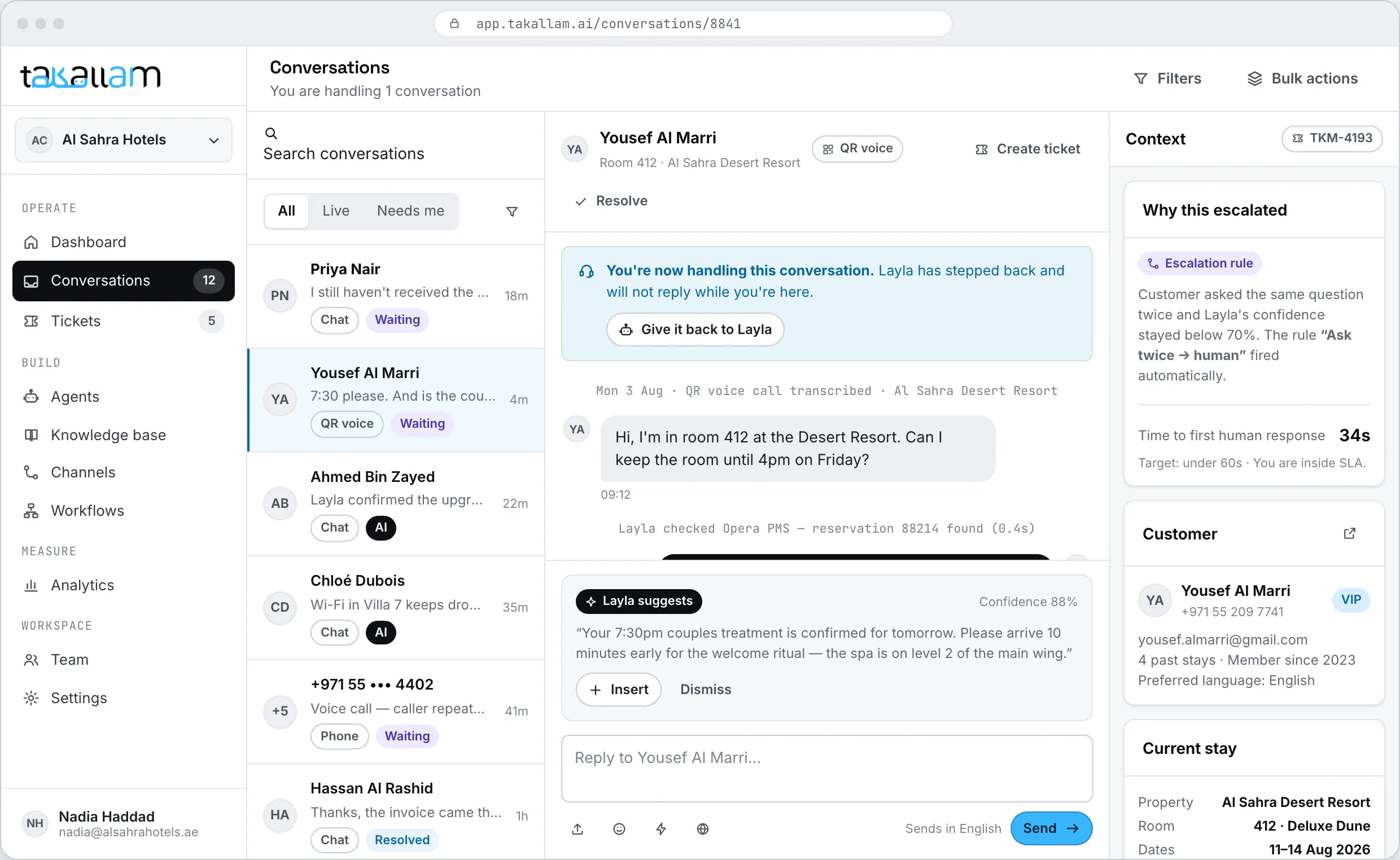
A person takes over in the same thread
Takallam flags the conversation — low confidence, an angry tone, a request the agent is not allowed to fulfil — and puts it in the human queue. Your agent opens it and sees the whole transcript, what the AI tried and why it stopped. Then they carry on.
- No transfer, no reference number, no asking the customer to start again.
- Escalation rules are yours to write, per agent and per channel.
- Calls and email threads escalate with the whole history attached, so nothing is repeated.
A ticket, only if the work outlives the conversation
Most conversations finish where they started. A ticket is for the ones that cannot: a refund that needs approval, a part that has to be ordered, a complaint that needs a manager tomorrow. You open one because the work continues, not because the software insists on it.
- Opened from inside the conversation in one action.
- Priority, owner and due time set as you open it.
- Workflows can open, update and close tickets without anyone clicking.
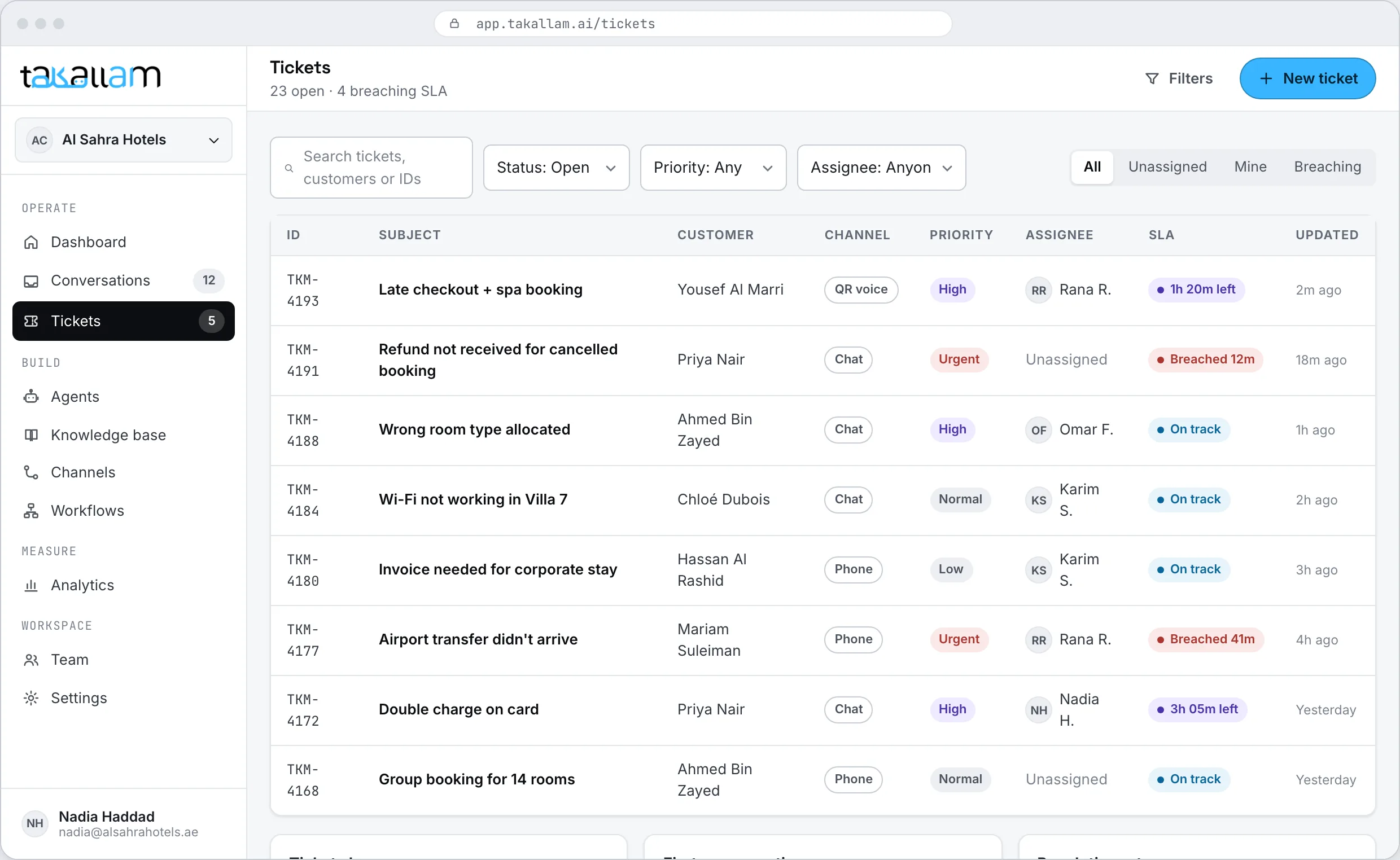
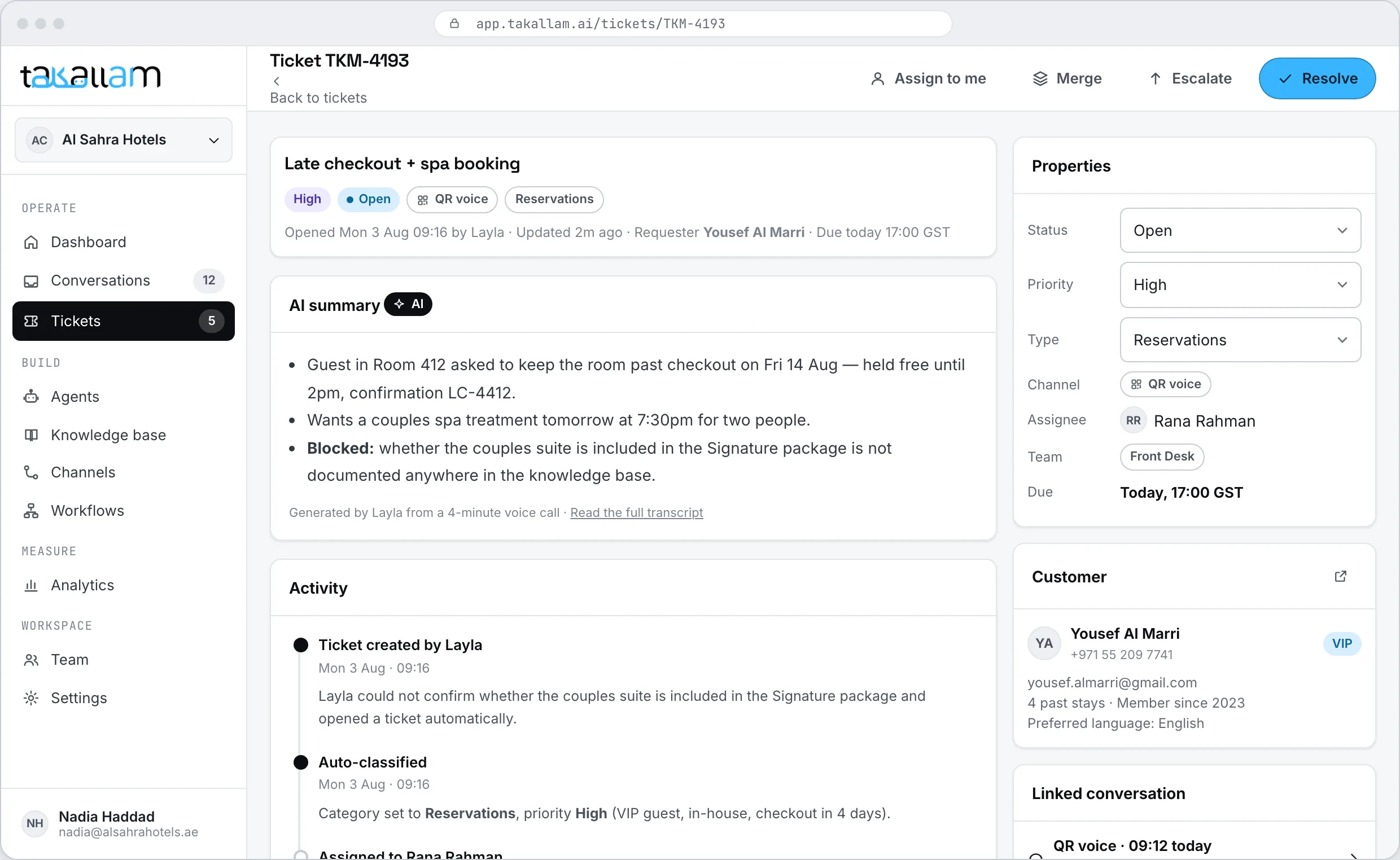
The ticket carries the conversation with it
A Takallam ticket is not a blank form someone re-types the story into. It arrives with the transcript, the channel it came from, the customer record and everything the AI already established, so whoever picks it up is not starting from zero.
- SLA timers you define, visible on the ticket and on the dashboard.
- Every reply and every takeover is recorded against a person.
- Close it and the customer hears back on the channel they started on.
A ticket is a fallback, not the unit of work
Helpdesks were designed when support meant email. Everything became a ticket because a ticket was the only object in the system. Takallam is organised around the conversation and opens a ticket when the conversation is not enough on its own.
| Takallam console | Ticketing suite + AI add-on | Voice-agent API | |
|---|---|---|---|
| Voice, chat, email and QR in one inbox | |||
| Email answered and triaged by the AI | |||
| Human takeover inside the same thread | |||
| Full transcript attached on escalation | |||
| A ticket is optional, not mandatory | No tickets at all | ||
| Tickets, SLAs and assignment | |||
| Knowledge base behind the answers | |||
| Roles and permissions for the team | |||
| Emirati and Gulf dialect on voice | |||
| Priced per interaction, not per seat |
Capability categories rather than named products. Ticketing suites are genuinely strong at long-running cases, email in particular, reporting depth and third-party integrations; voice APIs give developers superb control over a call. This table is about how the day-to-day console is organised.
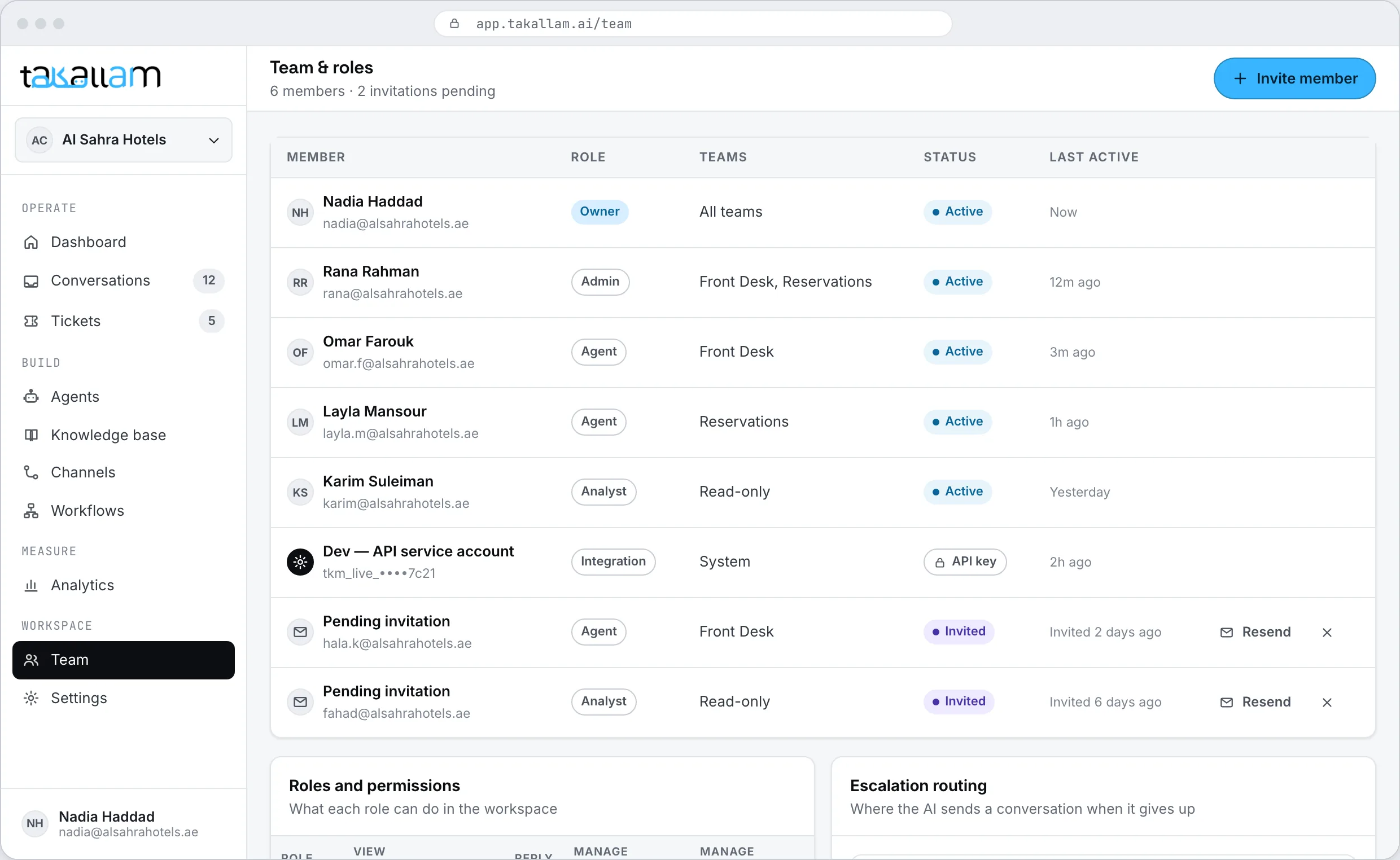
Who can see what, and who can change what
Invite your team, give people roles, and decide what each role can touch — conversations, tickets, knowledge, agents, workflows, billing. The weekend supervisor does not need the same access as the person who edits what an agent is allowed to promise.
- Roles for agents, supervisors and admins, with per-area permissions.
- Assign a conversation or a ticket to a person or to a team.
- Every takeover, reply and edit is recorded against the person who did it.
- Access can be removed without disturbing anyone else.
The console is one part of the platform
Workflows
What happens around the conversation: update the PMS, send the confirmation, log the call, open the ticket.
See the workflow builderAnalytics
Resolution rate by channel and by agent, the topics customers actually raise, and the knowledge gaps behind escalations.
See what it measuresArabic
Emirati and Gulf dialect in voice and text, including customers who switch language mid-sentence.
How Takallam handles ArabicThe channels
QR voice, in-app and web chat, your support inbox, and a real phone number — set up per agent, not per tool.
See all four channelsAPI and webhooks
Every action in the console is an endpoint, and every escalation and ticket event fires a signed webhook.
Read the API referenceNo seats to count
Put your whole team in the console. You pay for interactions with customers, not for chairs.
How pricing worksWhat people ask about the console
What is the Takallam support console?
It is where your team works. One inbox across QR voice, in-app and web chat, email and phone, a queue of conversations the AI flagged for a human, takeover inside the same thread, tickets and SLAs for work that continues afterwards, plus the knowledge base, analytics and team permissions.
Do we have to open a ticket for everything?
No. Most conversations end in the conversation, and Takallam does not force a ticket around them. You open a ticket when the work outlives the conversation — an approval, an order, a callback tomorrow — and then the ticket carries the transcript and the customer record with it.
Can a person take over while the customer is still there?
Yes. On chat, QR and email conversations your agent continues in the same thread the AI was in, and the customer sees no restart — an email reply still goes out from your own address. A phone call escalates to your team with the full conversation attached, so the person who picks it up already knows what was said.
How does the AI decide when to escalate?
You write the rules, per agent and per channel. Common ones are low confidence in the answer, a tone flag, a topic the agent is not allowed to handle, or an explicit request for a human. Every escalation records its reason, which is what makes escalation analysable rather than mysterious.
Can we see phone calls, emails and chats in the same place?
Yes, and that is the point of the console. Calls are transcribed and sit in the same inbox as chats, email threads and QR conversations, with the same filters, the same search and the same customer history.
How many seats do we pay for?
None. There are no per-seat licences, so you can put your whole team in the console. You pay per interaction, and each channel is priced separately because a phone call and a chat message do not cost the same to deliver.
Can we set SLAs and assign owners?
Yes. Tickets take a priority, an owner and a due time, and the clock is visible on the ticket and on the dashboard. Workflows can escalate or reassign a ticket automatically when it gets close to breaching.
Does the console handle Arabic conversations?
Yes. Your customers get Emirati and Gulf dialect in voice and text, and your team reads the conversation in the console exactly as it happened, including conversations that switched between Arabic and English mid-sentence.
See your own conversations in it
We are onboarding a first cohort in the UAE now. Tell us which channels you need and we will set the console up against your real volume.
Pay per interaction, priced separately for each channel. No seats, no minimums.