
It has already read your website
Takallam crawls your site during setup and turns what it finds into the knowledge your agents answer from. You add the things that were never on the website — a rate card, a policy document, a live booking system — and you can see every source it uses, one page at a time. Nothing gets used that you have not been shown.
One website address is the whole first step
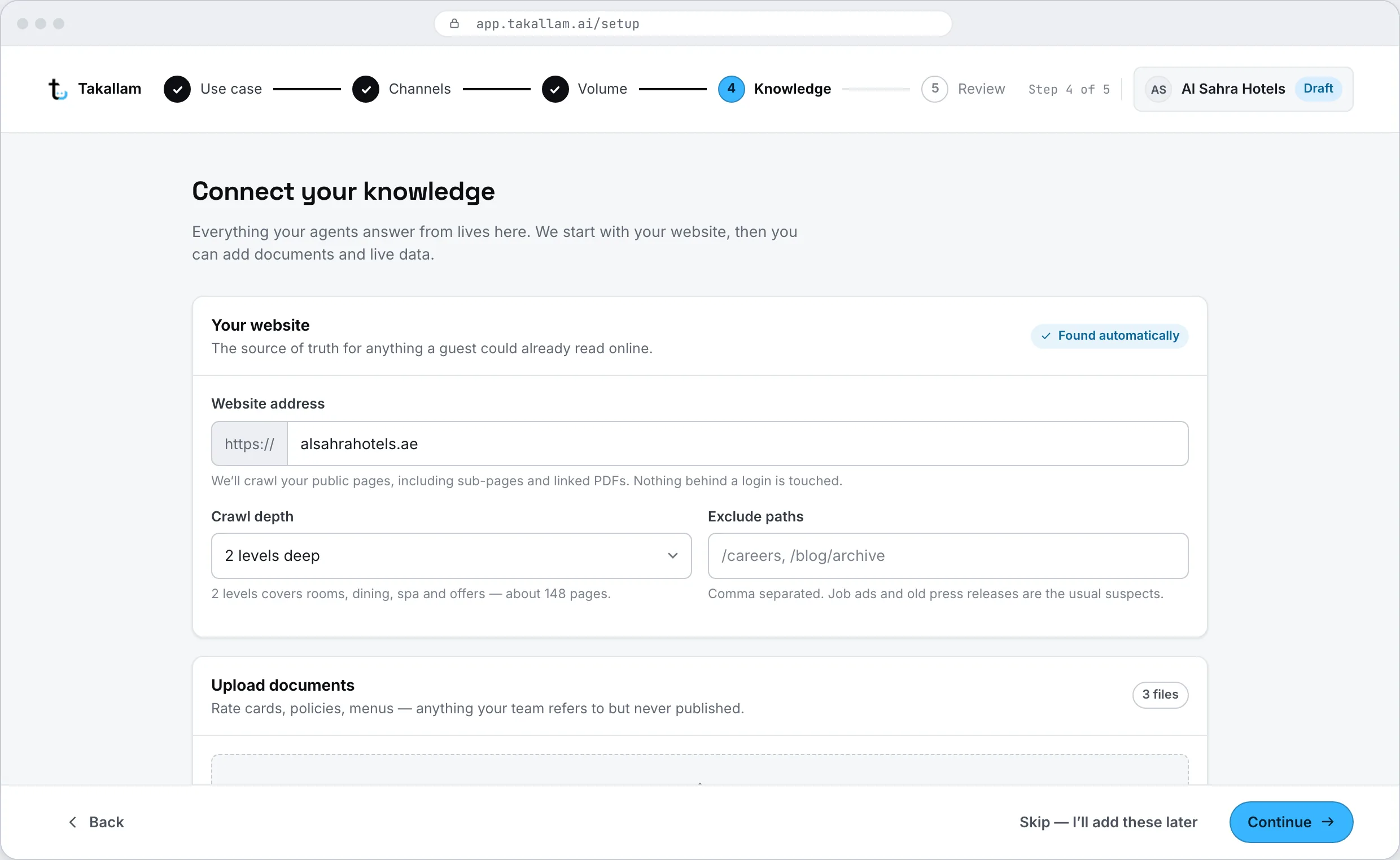
During setup you give Takallam your website. That is the input. It walks the site the way a customer would — the pages, the FAQs, the policies, the rates, the opening hours — and turns what it reads into answers your agents can use. If you already have documents ready, you can add them in the same step.
- Your public site is usually most of what customers actually ask about.
- Upload PDFs and Word documents at the same time if you have them.
- Point it at one section of the site if that is all it should read.
The crawl runs while your workspace is being built
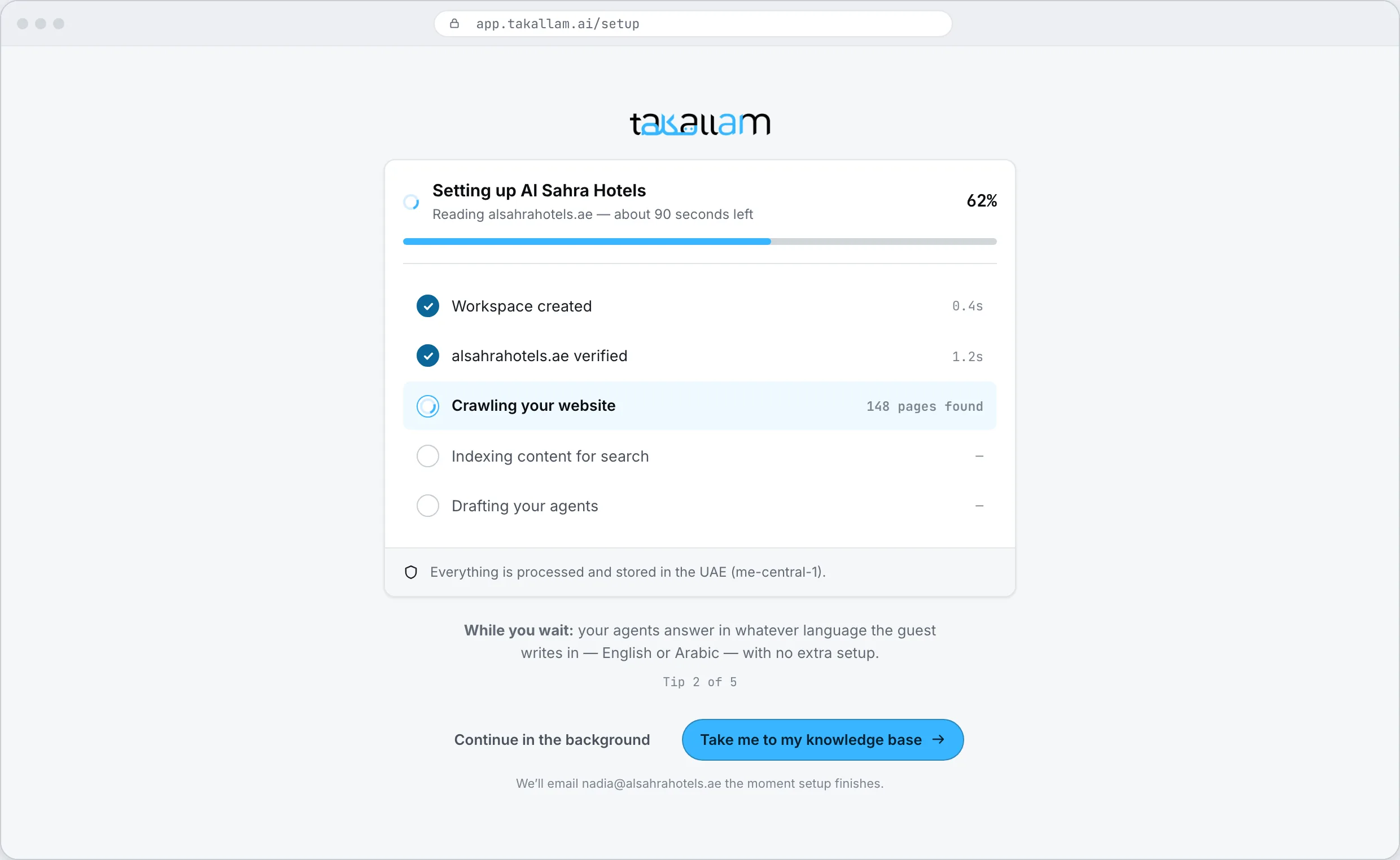
You are not sitting in front of a progress bar with nothing happening behind it. Takallam creates the workspace, reads the site, builds the knowledge base and drafts your first agents in the same pass. When it finishes you are not looking at an empty product — you are looking at a knowledge base and a set of agents to review.
- Setup and knowledge are one step, not a project you schedule afterwards.
- You can watch what it is reading as it reads it.
- Close the tab and come back — it keeps going without you.
Three places the answers come from
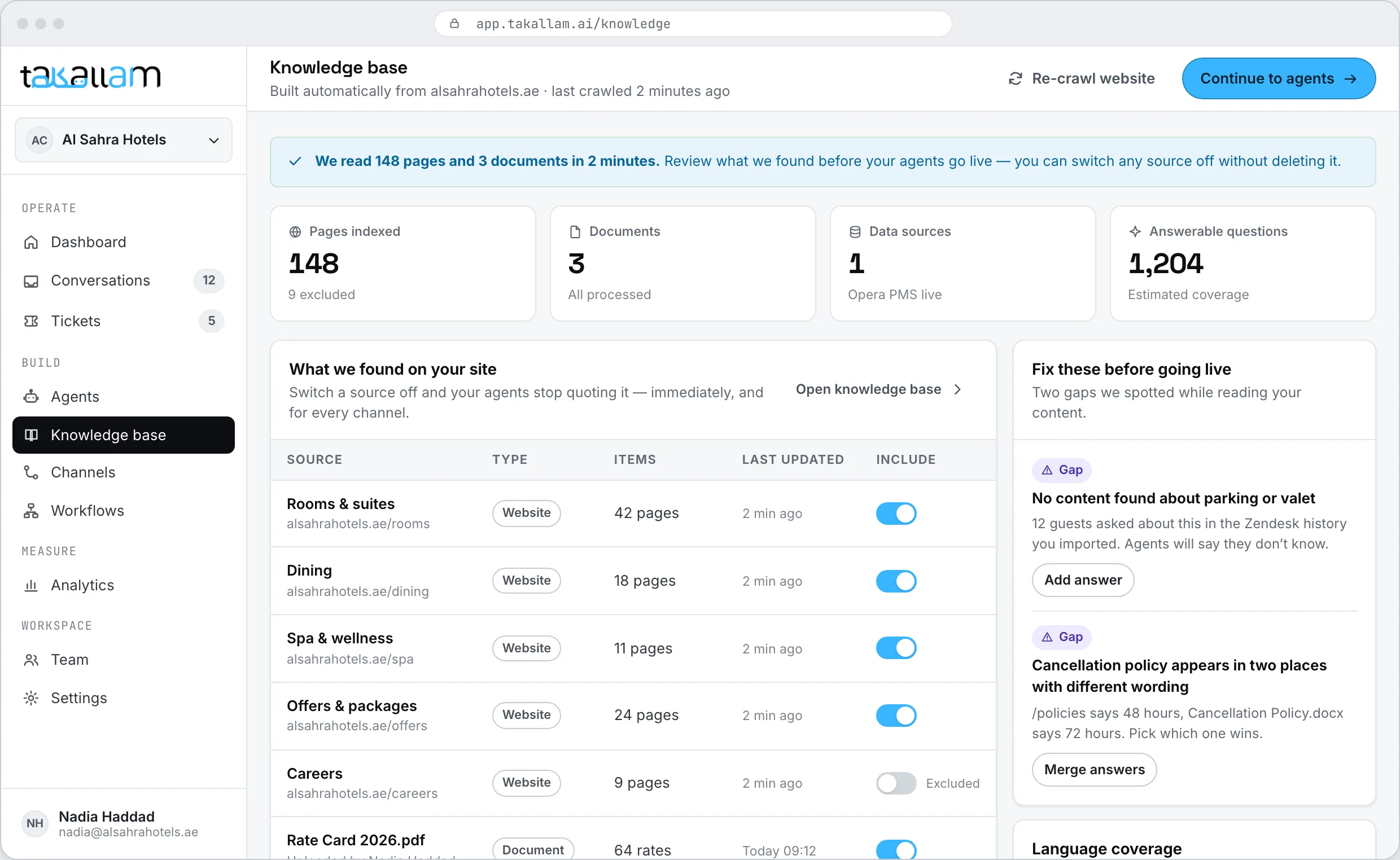
Most of what customers ask about is already public. The rest is sitting in a document or a database, and both plug in.
Your website
Crawled automatically at setup and re-crawled afterwards, so a change you publish makes it into the answers. Anything you exclude is left alone.
Documents
PDF and Word uploads for the things that never made it onto the site — a rate sheet, a policy, an internal FAQ your team keeps re-sending.
Connected systems
A live source rather than a copy: a PMS for room availability, an order database for delivery status. The agent reads it at the moment it is asked.
Act on those systems tooYou see every page it read, and you can take any of them out
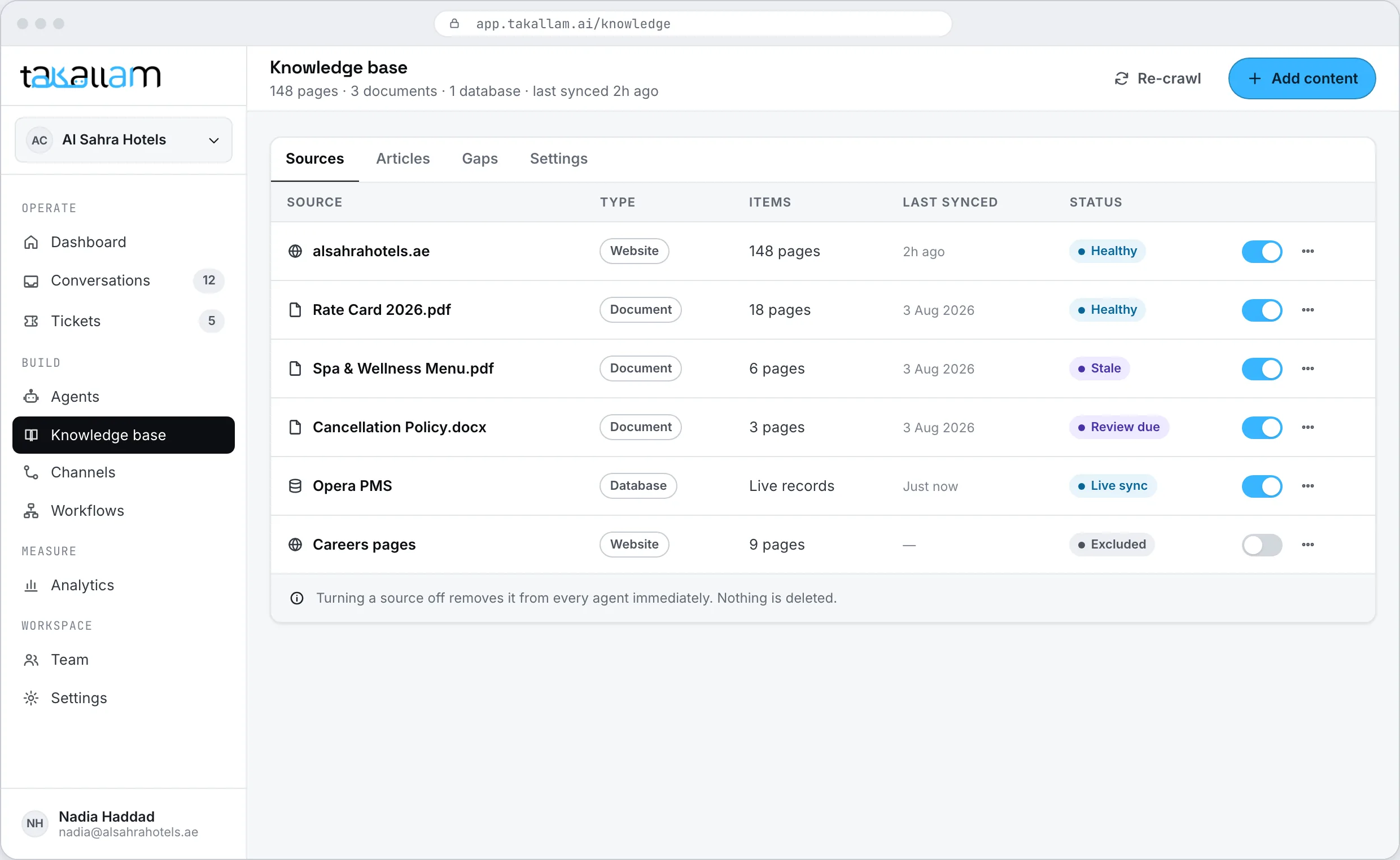
This is the part most tools keep behind glass. Takallam shows you the full list of what it learned from — every page, every document, every connected source — and what it took from each one. If something is out of date, wrong, or none of a customer's business, remove it and your agents stop using it.
- Open any source and read exactly what an agent would answer from.
- Remove a page, a document or a whole section, and it stops being used.
- Go through the list once at setup, and again whenever something changes.
The price changed on Tuesday. The agent should know by Tuesday.
A knowledge base that was right at launch and never touched again is how AI support goes wrong. Takallam re-crawls your site, shows you what changed, and lets you write an answer by hand when editing the website is the slower way to fix it.
- Re-crawl on a schedule, or run one after you publish a change.
- Write or edit an answer directly when the website is not the right place for it.
- See which parts of the knowledge base are actually being used to answer people.
Each agent only gets the knowledge it needs
One knowledge base for the whole workspace is usually right. Sometimes it is not: a billing agent has no business quoting room rates, and a public front-desk agent should never see your internal escalation matrix. In the agent builder you choose which knowledge that agent is pointed at.
- Share one knowledge base across agents, or scope a narrower one to a single agent.
- Keep internal documents out of a customer-facing agent entirely.
- Change what an agent knows without rebuilding the agent.
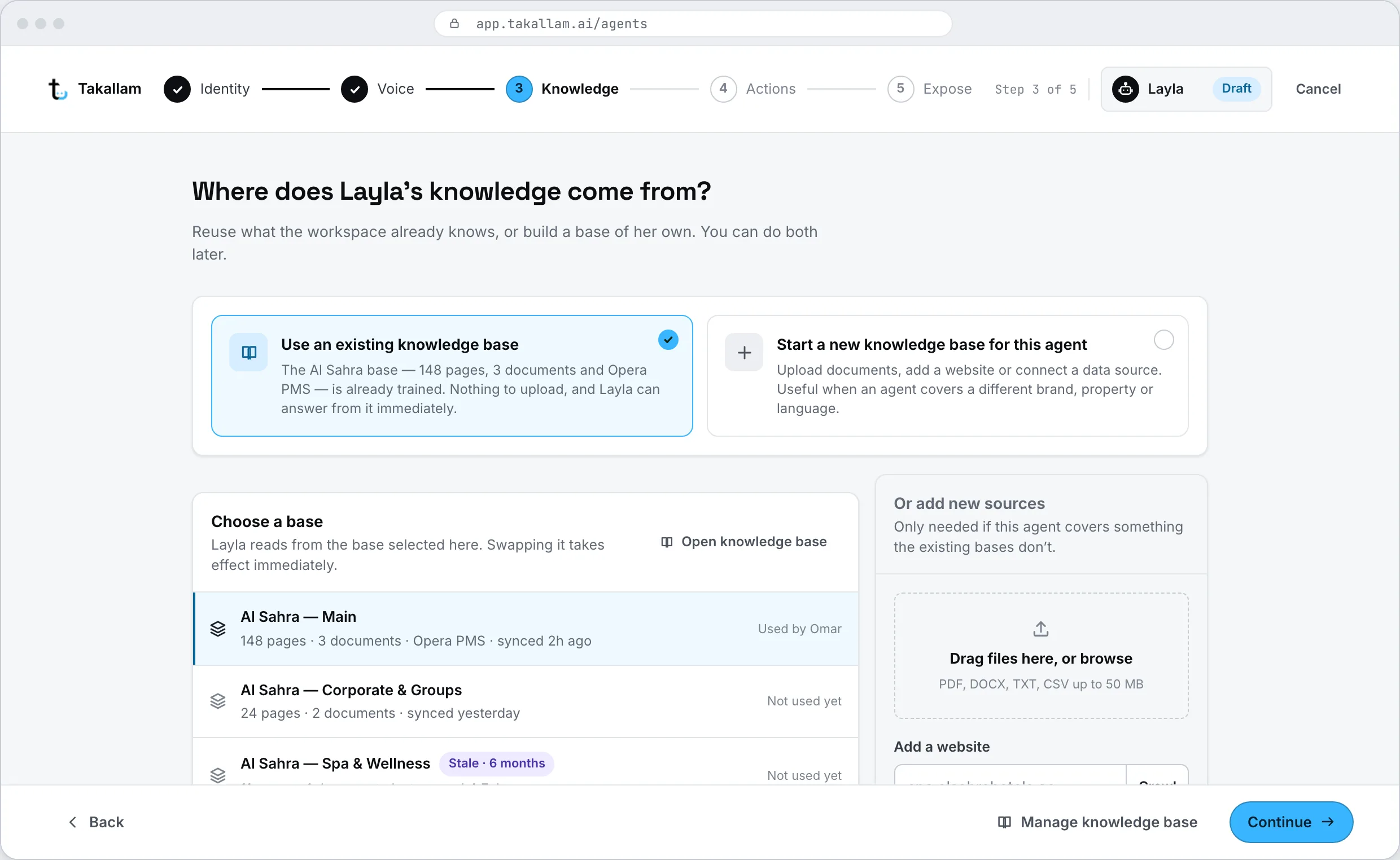
When the answer is not in there, it does not invent one
A support agent that guesses is worse than no agent at all. Takallam is built to admit the gap and move the conversation to someone who can close it.
It says it does not know
No confident-sounding invention. The customer gets a straight answer about what it cannot help with, rather than a plausible wrong one.
It escalates instead
The conversation moves to your team on whichever channel it started — a QR scan, chat, email or the phone — with the full transcript attached, so nobody has to explain themselves twice.
How takeover worksYou see the gap
Questions it could not answer are recorded, so the missing page or document is something you can find rather than something you guess at.
You close it
Add the page, upload the document, connect the system or write the answer yourself — and the next customer who asks gets it.
Push knowledge from wherever it actually lives
If your source of truth is a CMS, a spreadsheet or your own database, you do not have to wait for a crawl. Add sources to a knowledge base over the API and every agent pointed at it picks them up.
- Add, list and remove sources over REST.
- Re-index from your own deploy pipeline when content ships.
- Signed webhooks when a crawl finishes or a source fails to read.
# Add a document to an agent's knowledge
curl https://api.takallam.ai/v1/agents/agt_014/knowledge \
  -H "Authorization: Bearer $TAKALLAM_KEY" \
  -d '{
    "source": "document",
    "title": "Rate card 2026",
    "url": "https://cdn.example.ae/rates-2026.pdf"
  }'

# List everything that agent can answer from
curl https://api.takallam.ai/v1/agents/agt_014/knowledge \
-H "Authorization: Bearer $TAKALLAM_KEY"What people ask about the knowledge base
Where does the knowledge come from?
Three places. Takallam crawls your website automatically during setup, you upload documents such as PDFs and Word files, and you can connect a live system like a property management system or an order database. All three feed the same knowledge base.
Can I see everything it learned from my site?
Yes, and this is deliberate. You get the full list of pages and documents it read, you can open any one of them to see what an agent would answer from, and you can remove anything that is wrong, out of date or not meant for customers.
What file types can I upload?
PDF and Word documents cover most of what businesses have — rate cards, policies, internal FAQs, procedure notes. If your content lives in a system rather than a file, connect the system instead so the agent reads the current version rather than a snapshot.
What happens when the AI does not know the answer?
It says so and escalates rather than guessing. The conversation goes to your team on the same channel with the transcript attached, and the question is recorded as a gap so you can add the missing page or document afterwards.
How often does it re-read my website?
On a schedule you set, and on demand whenever you want. Re-crawling matters more than people expect — most bad AI support answers are correct answers to a version of your site that no longer exists.
Can it read from our booking system instead of a document?
Yes. A connected system is read live at the moment the customer asks, which is the difference between "our standard check-out is midday" and "your check-out is booked for 2pm". Documents are for policy; connected systems are for anything that changes.
Does the same knowledge base answer email too?
Yes. One knowledge base sits behind all four channels — a QR scan, chat, your support inbox and the phone. Change a fee or a policy once and the emailed reply, the chat reply and the spoken answer all change with it, so nobody gets a different version of the truth depending on where they asked.
Can different agents have different knowledge?
Yes. Most workspaces share one knowledge base, but you can scope a narrower one to a single agent — useful when an agent handles something internal, or when a public agent should not have access to everything the business knows.
Where is the knowledge base stored?
In the UAE region by default. Your pages, documents and conversation transcripts stay in-region, and you decide what is retained and for how long.
See what Takallam would learn from your site
We are onboarding a first cohort in the UAE now. Tell us your website and what your customers ask about most, and we will walk through what the knowledge base would look like before you commit to anything.
Pay per interaction · priced per channel · no seats, no minimums