
From a blank sign-up form to a live agent
This is the whole product, in the order you meet it. Four questions, a knowledge base built from your own website, an agent you shape and test, and four channels to put it on. Behind that: the console your team works in and the workflows that run once the conversation ends.
Six pieces, one product
Nothing here is an add-on you buy later, and nothing here is a second vendor. This is what is in the box.
Onboarding
Four questions and your website address. Takallam provisions the workspace, reads your site and drafts your first agents from what it found.
Knowledge base
Your pages, policies, rates and documents in one place. Every source is listed, editable and removable, and every agent points at it.
Agent builder
Identity, voice and languages, the knowledge it may use, the actions it may take, and the channels it answers on — one flow, not five settings screens.
Inside the agent builder04Channels
QR voice, in-app and web chat, email, phone. The same agent on all four, with one record of the customer across them.
How QR voice works05Support console
One inbox across every channel, human takeover in the same thread, tickets, SLAs and conversation analytics.
Inside the support console06Workflows
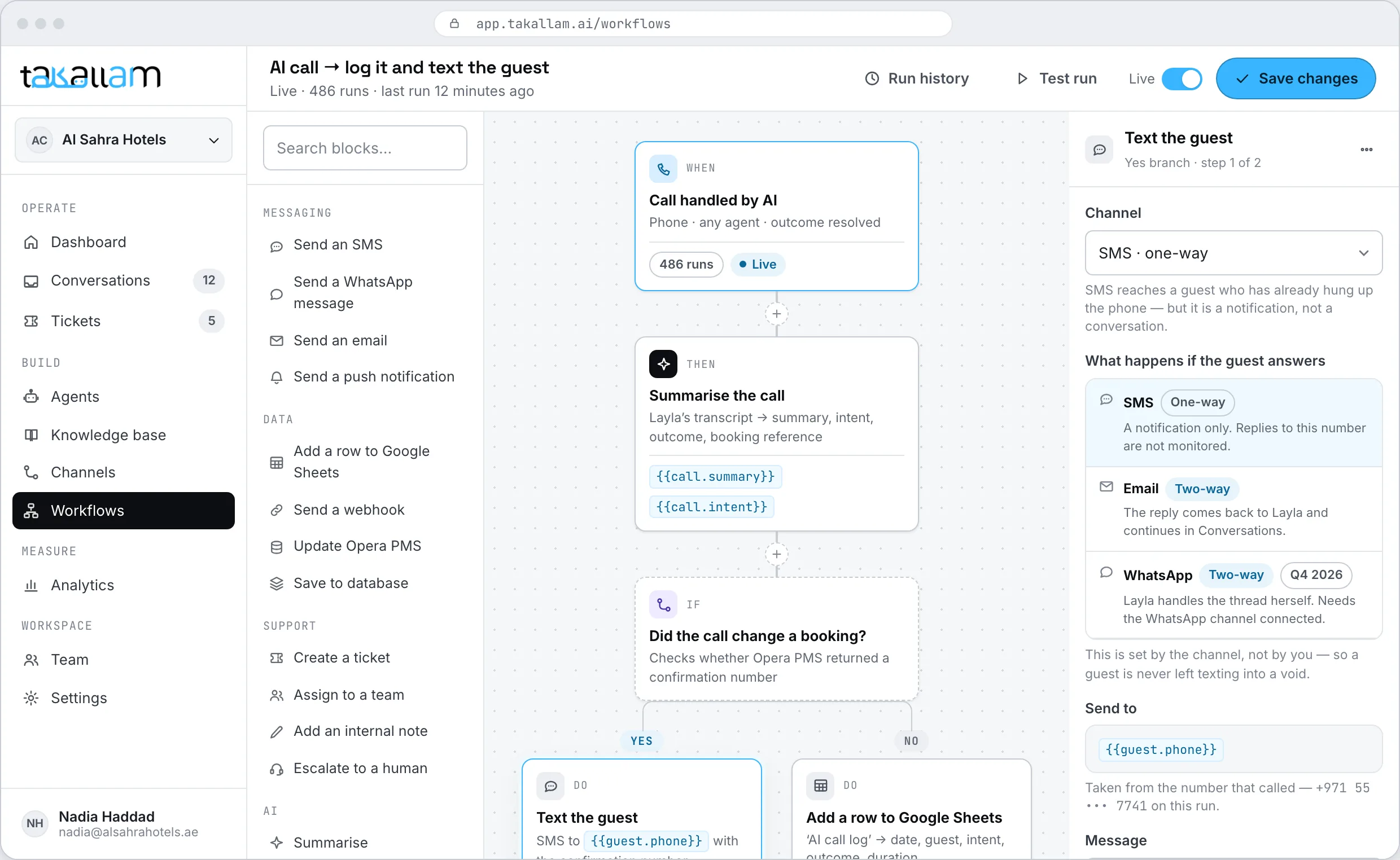
When something happens, do this, unless that. Update a system, send a message, tell a person — built by dragging blocks.
See the workflow builderSeven screens between signing up and answering a customer
Most of the work is done for you. What you actually spend time on is reviewing what Takallam learned about your business and deciding what each agent is allowed to do.
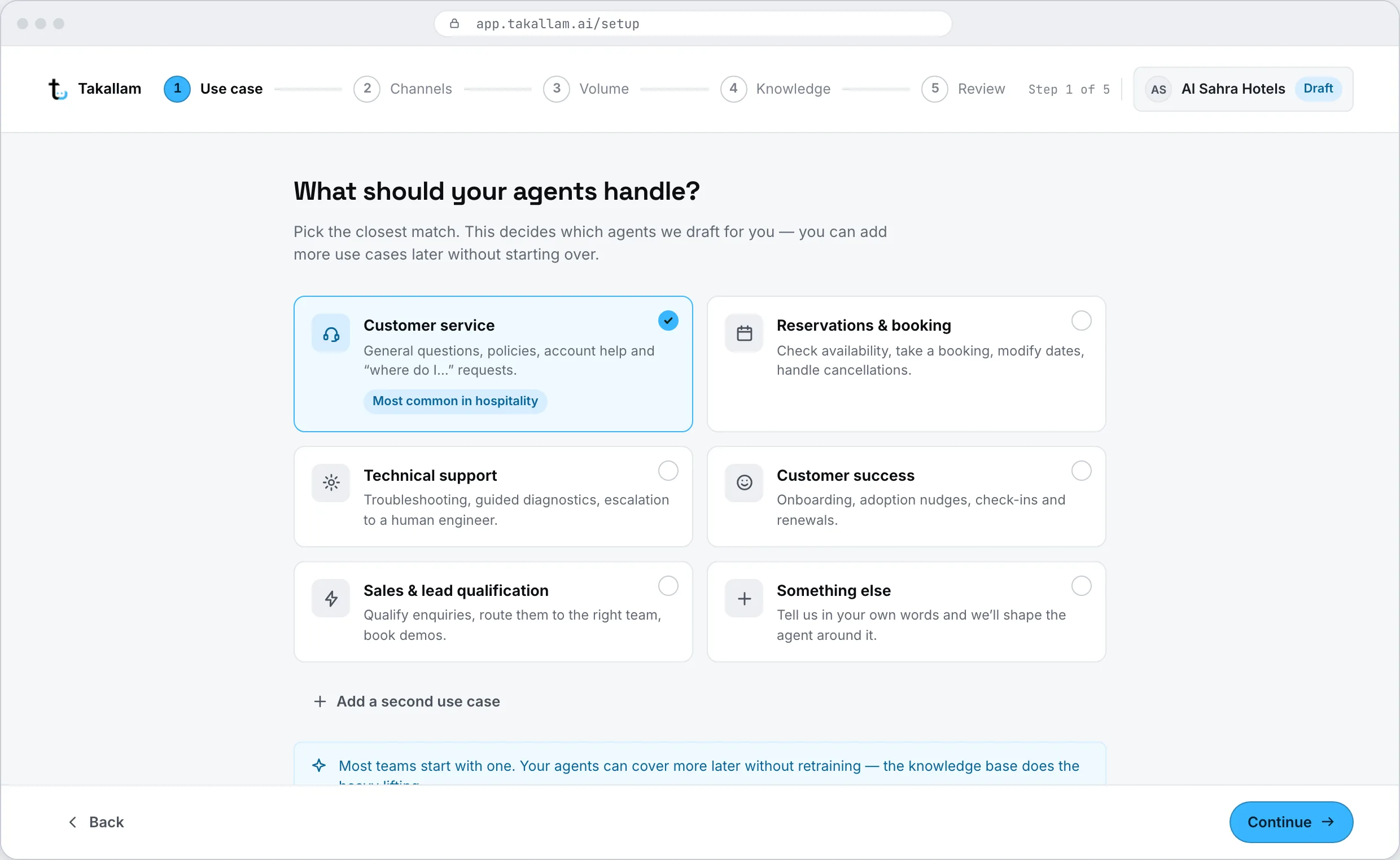
Sign up and answer four questions
What your business does, where your customers reach you today, roughly how many conversations you handle a month, and your website. That is the entire form. No implementation call, no scoping document, no sales gate before you see the product.
- Verify your email, name the workspace, and you are inside.
- Your four answers set the defaults for everything after this — all of them can be changed later.
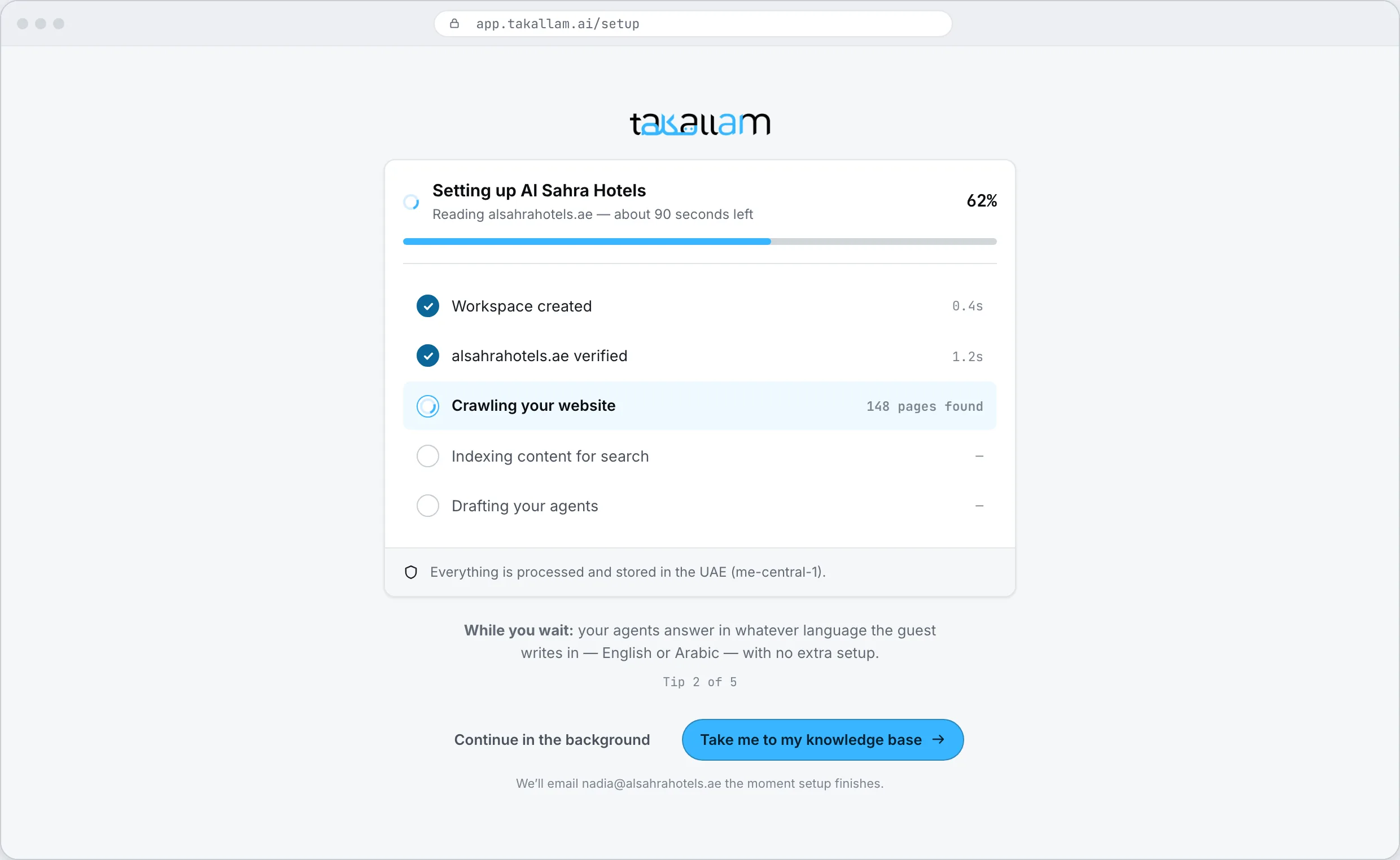
Takallam builds the workspace
While you wait, it provisions your workspace, crawls your website, extracts what it can use, and drafts a first set of agents from what it found. You watch it happen instead of filling in more forms.
- Minutes, not a scheduled implementation week.
- Suggested agents arrive with a role and a starting brief you can accept or rewrite.
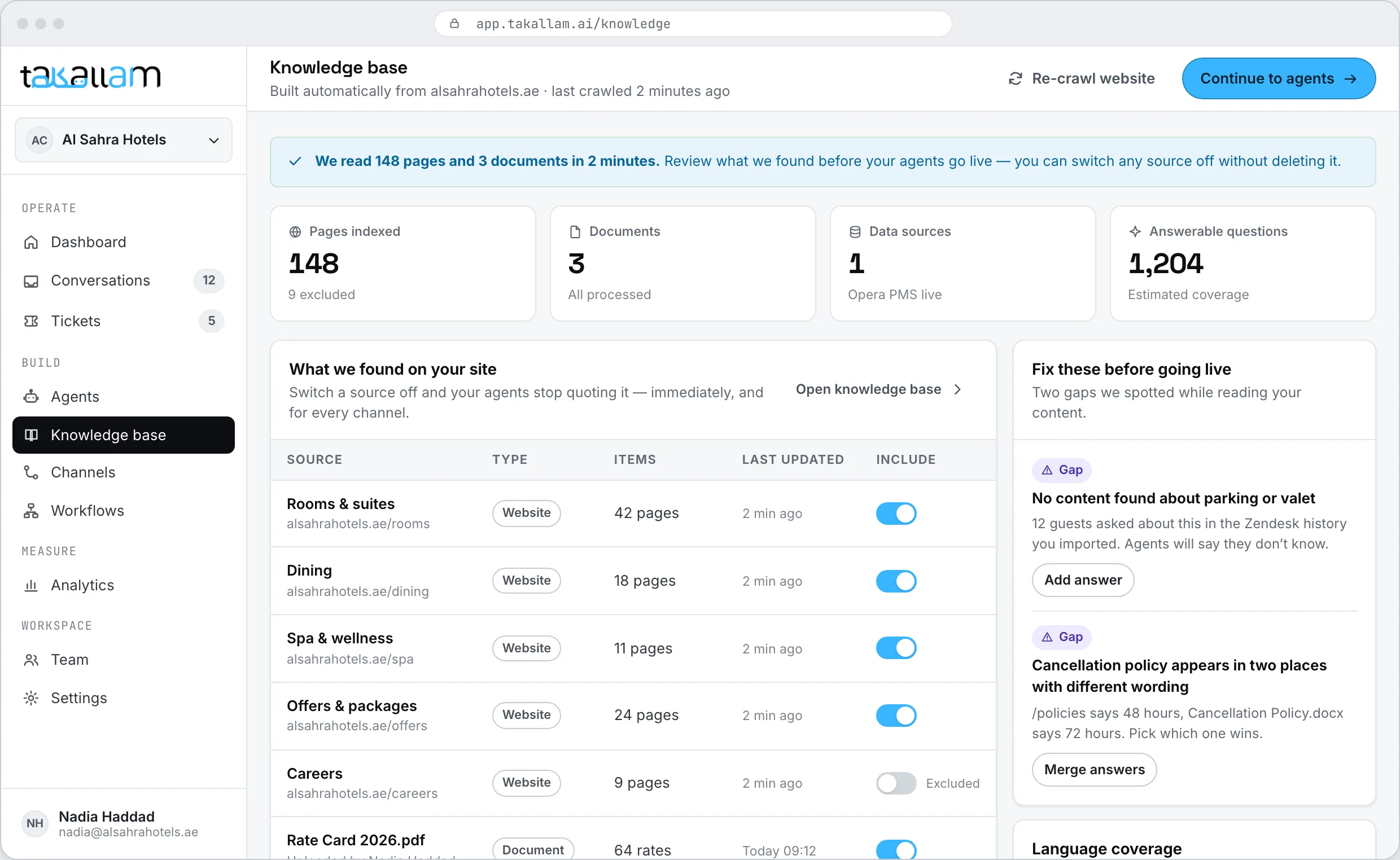
Review what it learned
Every page it read and every fact it pulled out is listed for you. Delete what is out of date, add what it missed, and connect a system if the answer lives in a database rather than on a page.
- Remove a source and your agents stop using it straight away.
- Upload PDFs, price lists and policy documents, or connect a PMS or an order database.
- The knowledge base stays live — update it once and every agent pointed at it updates too.
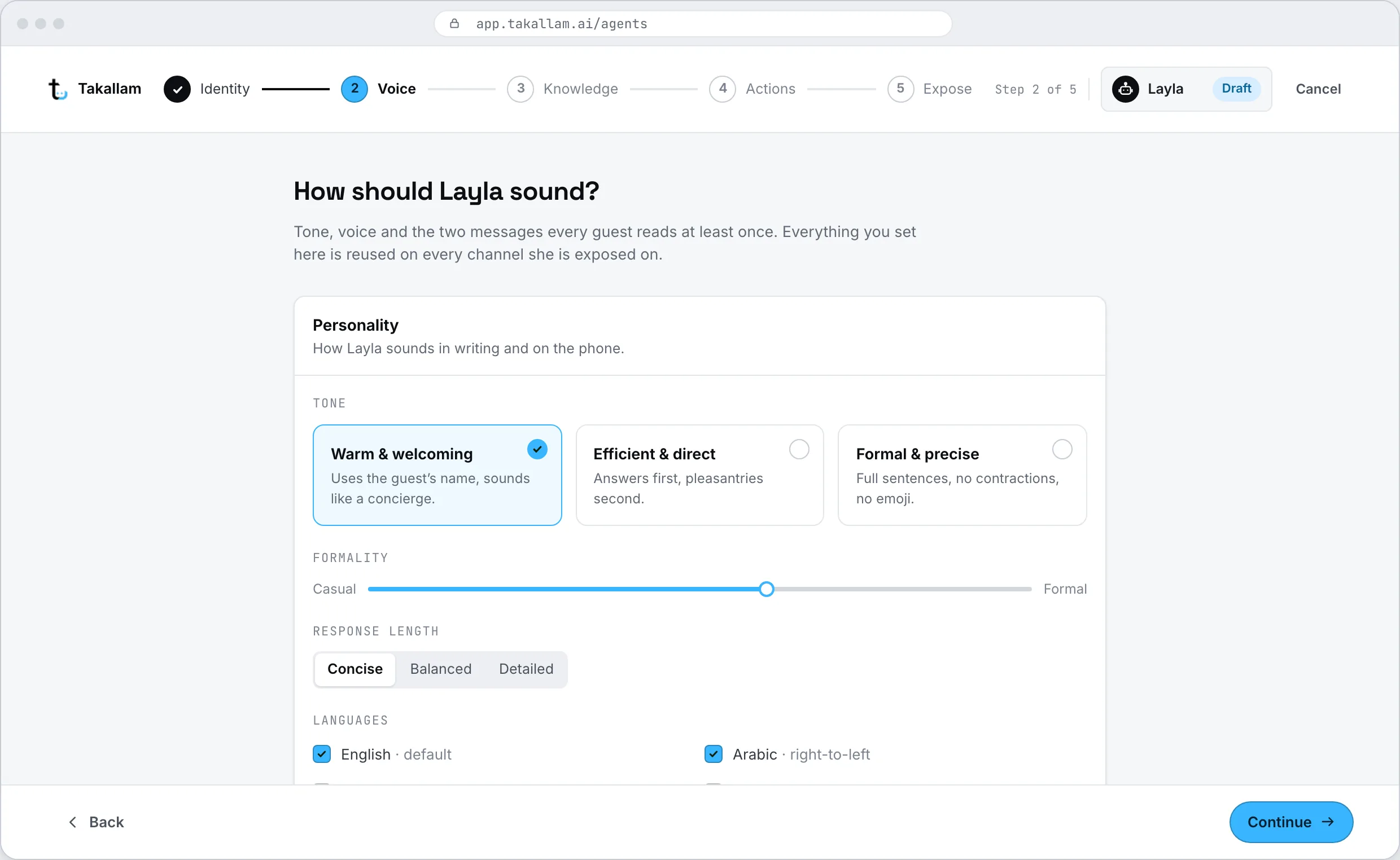
Shape the agent
Give it a name and a job. Choose the language it opens in and the voice it uses on calls. Point it at the knowledge it is allowed to use. Then decide what it can actually do on its own — look up a booking, raise a ticket, send a confirmation — and where it must stop and fetch a person.
- Identity and tone: how it greets, how formal it is, what it says when it does not know.
- Voice and language: English and Arabic, including Emirati and Gulf dialect on calls.
- Knowledge: the whole base, or a slice of it, per agent.
- Actions: what it may do unsupervised, and the line where it escalates.
Choose where it answers
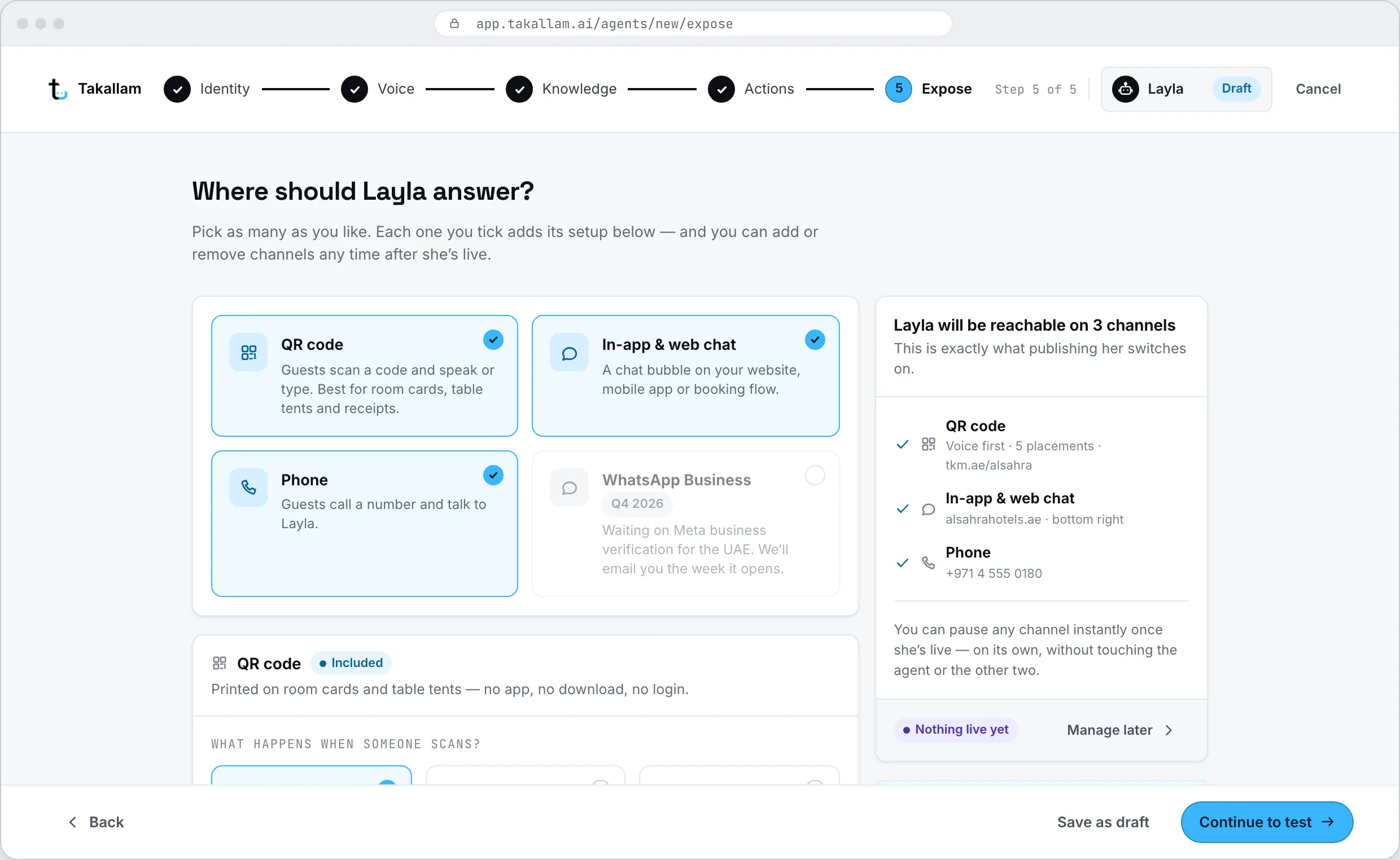
Tick the channels — QR voice, in-app and web chat, email, phone — and each one opens its own setup as you tick it. Generate and download a code. Copy an embed snippet. Forward your support inbox. Attach a number, new or existing.
- One agent can hold all four channels, or you can run a different agent per channel.
- A separate QR code per location, so you can see which one gets scanned.
- Forward [email protected], or connect Google Workspace or Microsoft 365.
- Point your existing phone number at Takallam, or take a new one.
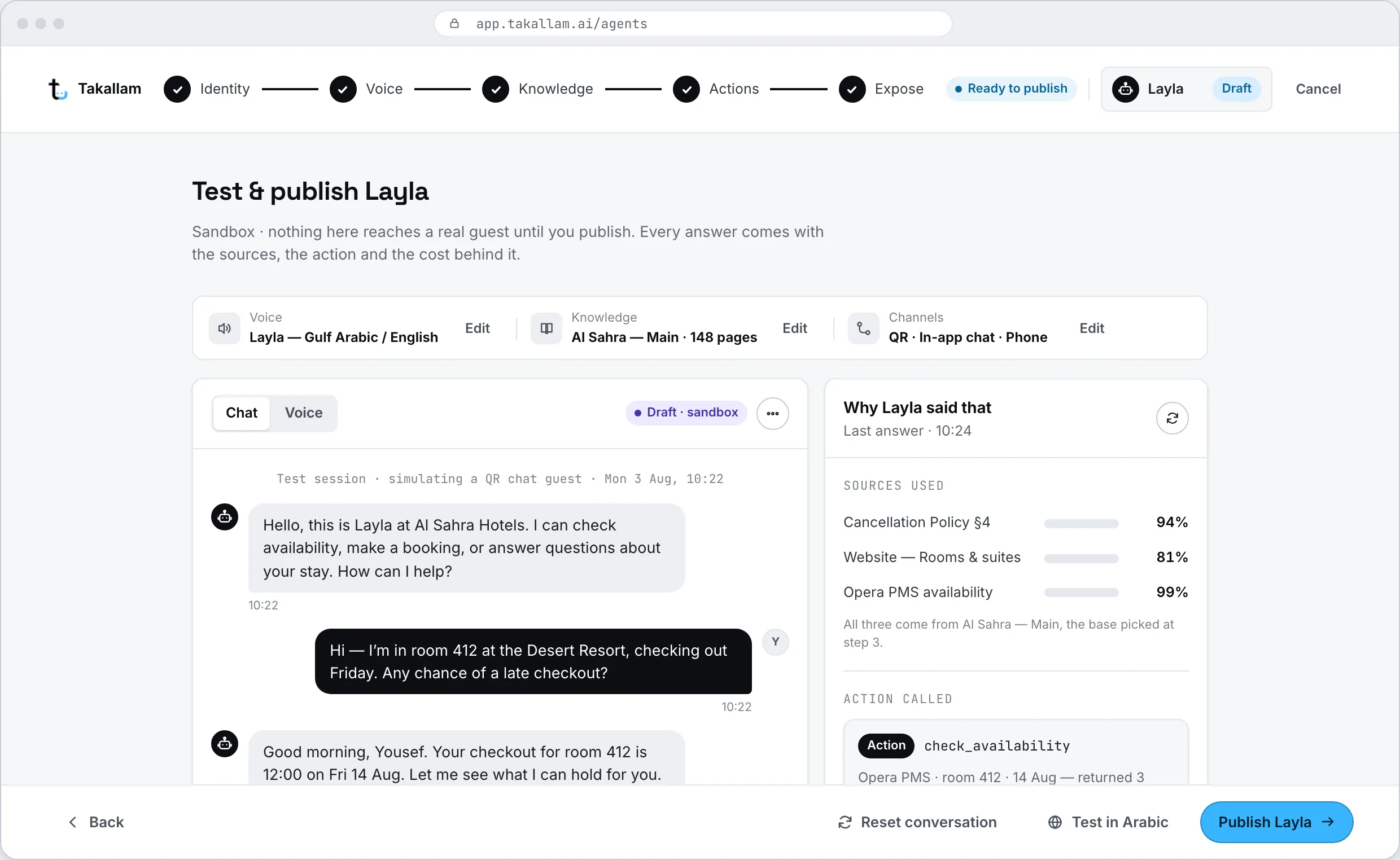
Test it before anyone outside sees it
Ask it the questions your customers actually ask. See what it answers, which source it used, and where its confidence drops. Fix the knowledge, adjust the brief, ask again. Nothing is public until you publish it.
- Every answer shows its source, so you can tell a knowledge gap from a tone problem.
- Try the awkward ones — refunds, complaints, the things it should refuse.
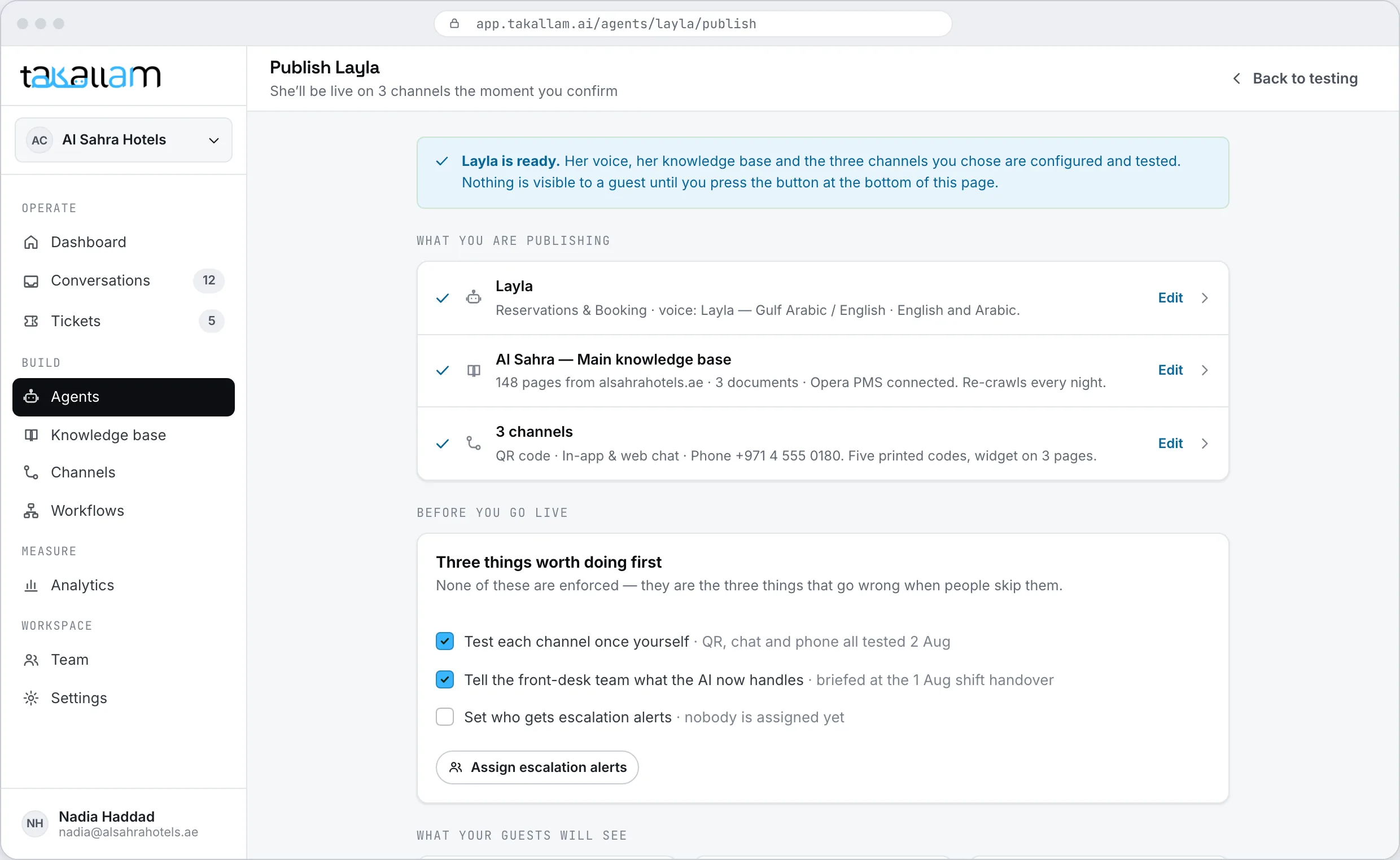
Go live
Publish, and the agent starts answering on the channels you gave it. Print the code, paste the snippet, forward the inbox, publish the number. From that moment everything it handles lands in one inbox, whichever channel it arrived on.
- Turn a single channel off without deleting the agent.
- Change the knowledge base or the brief and it is live everywhere at once.
- Watch the first real conversations in the console as they come in.
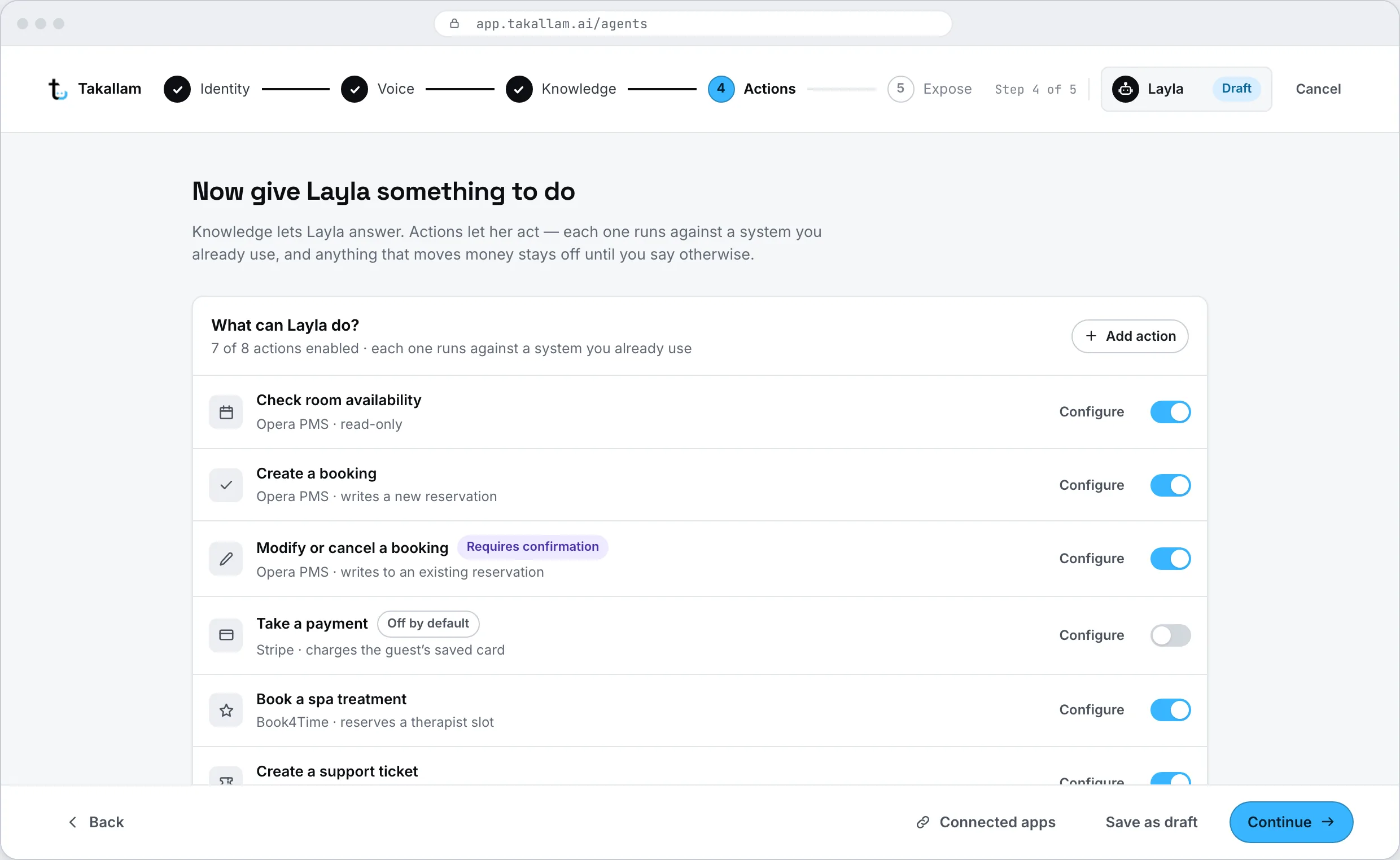
An agent is a job description, not a chatbot
Most tools give you one bot and a settings page. Takallam gives you agents with roles — reservations, billing, deliveries, the front desk — each with its own knowledge, its own voice and its own limits. Actions are the part that matters: they are the difference between an agent that answers and an agent that does something.
- Per-agent knowledge, so the billing agent cannot answer with the room-service menu.
- Actions with boundaries: look it up, raise it, send it, or hand it to a person.
- Escalation rules written per agent and per channel, not one global switch.
- Duplicate an agent to spin up a second one for another brand or branch.
Four places the same agent shows up
The channel changes. The knowledge, the record of the customer and the person who takes over do not.
A printed code the customer speaks to
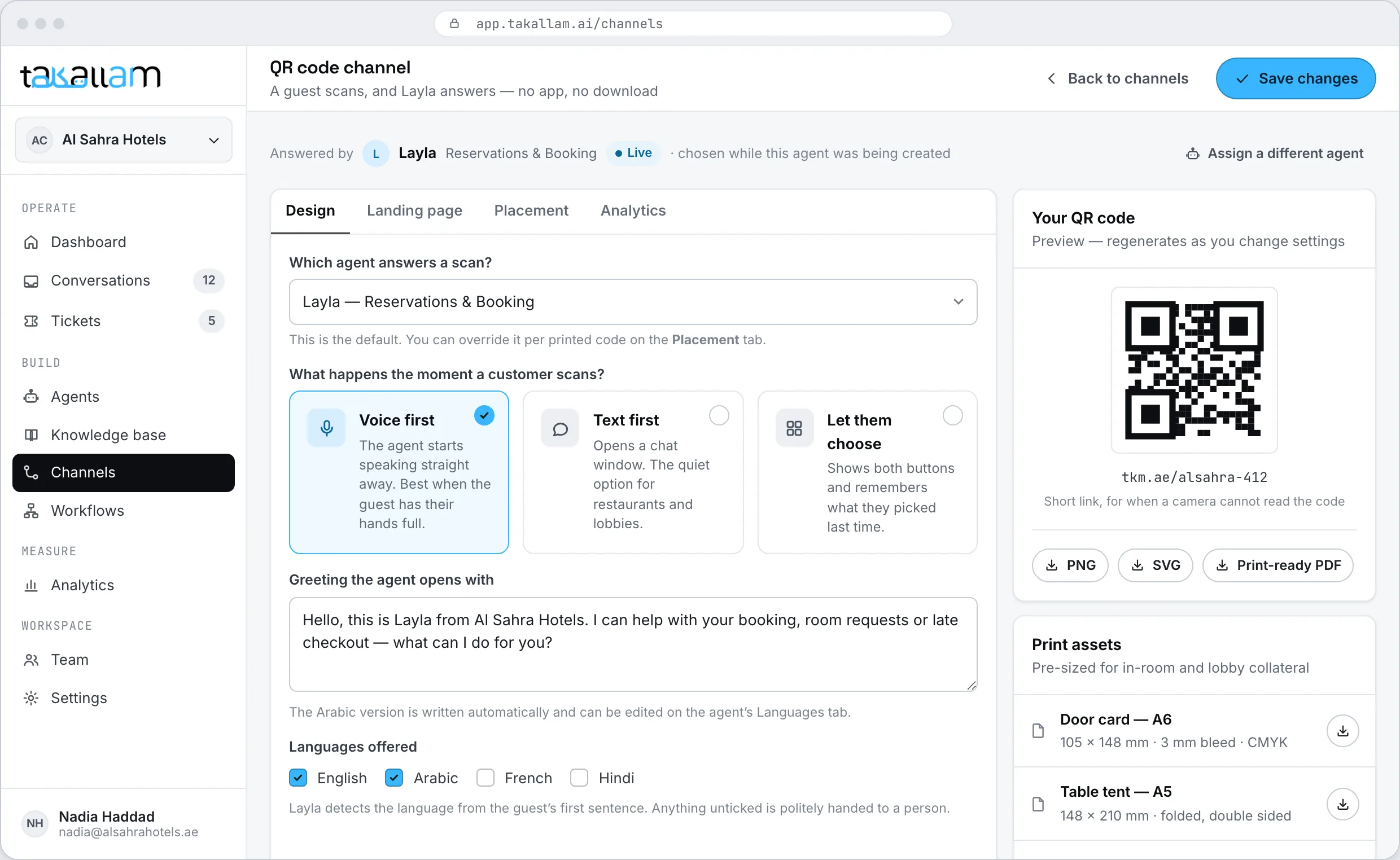
Generate a code, print it, and put it where the question happens — a hotel room door, a shelf edge, a service counter, the side of a delivery box. The customer scans it with their camera and talks. No app, no download, no number to dial.
- Opens voice-first, and switches to text mid-conversation without losing the thread.
- A separate code per location, so you can see where the questions come from.
- Nothing for the customer to install, and nothing for you to hand out.
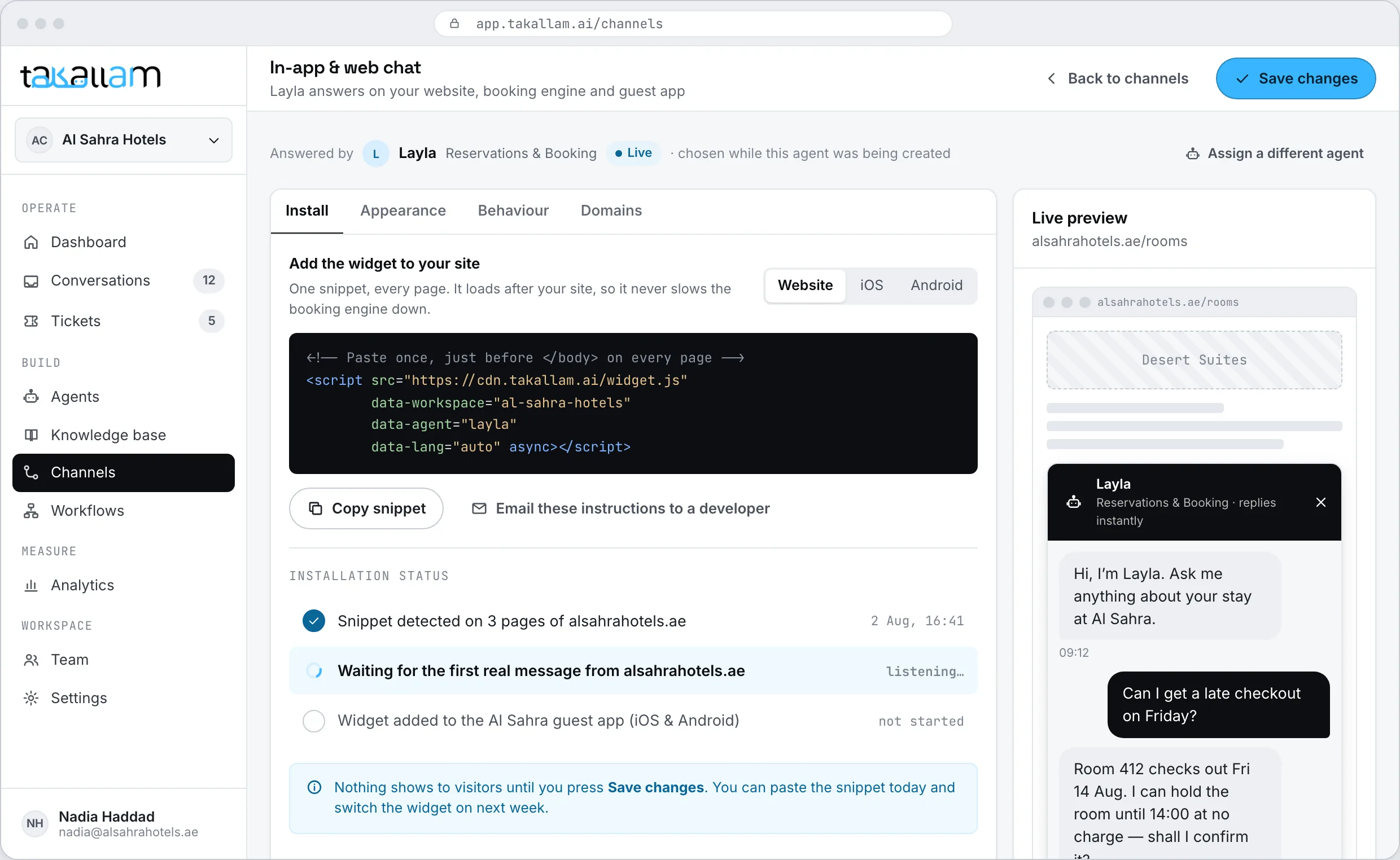
A snippet on your site, an SDK in your app
The same agent, the same knowledge, inside the product your customer is already using. It can answer, and it can act — check an order, raise a ticket, send a confirmation.
- Drop-in embed for the web, iOS and Android SDKs for a mobile app.
- Picks up a conversation that started on a call this morning.
- Hands over to a person in the same window, without restarting.
Your support inbox, answered from your own address
Forward [email protected] to Takallam, or connect the mailbox directly. The agent reads the whole thread, replies in-thread from your own address, and triages the rest — tagged by intent, routed by your rules, escalated when it should not be answering.
- Replies from your own domain, in the language the customer wrote in.
- Reads attachments — an invoice, a booking confirmation, a photo of a damaged item.
- Run it in draft mode first: the agent writes, a person approves.
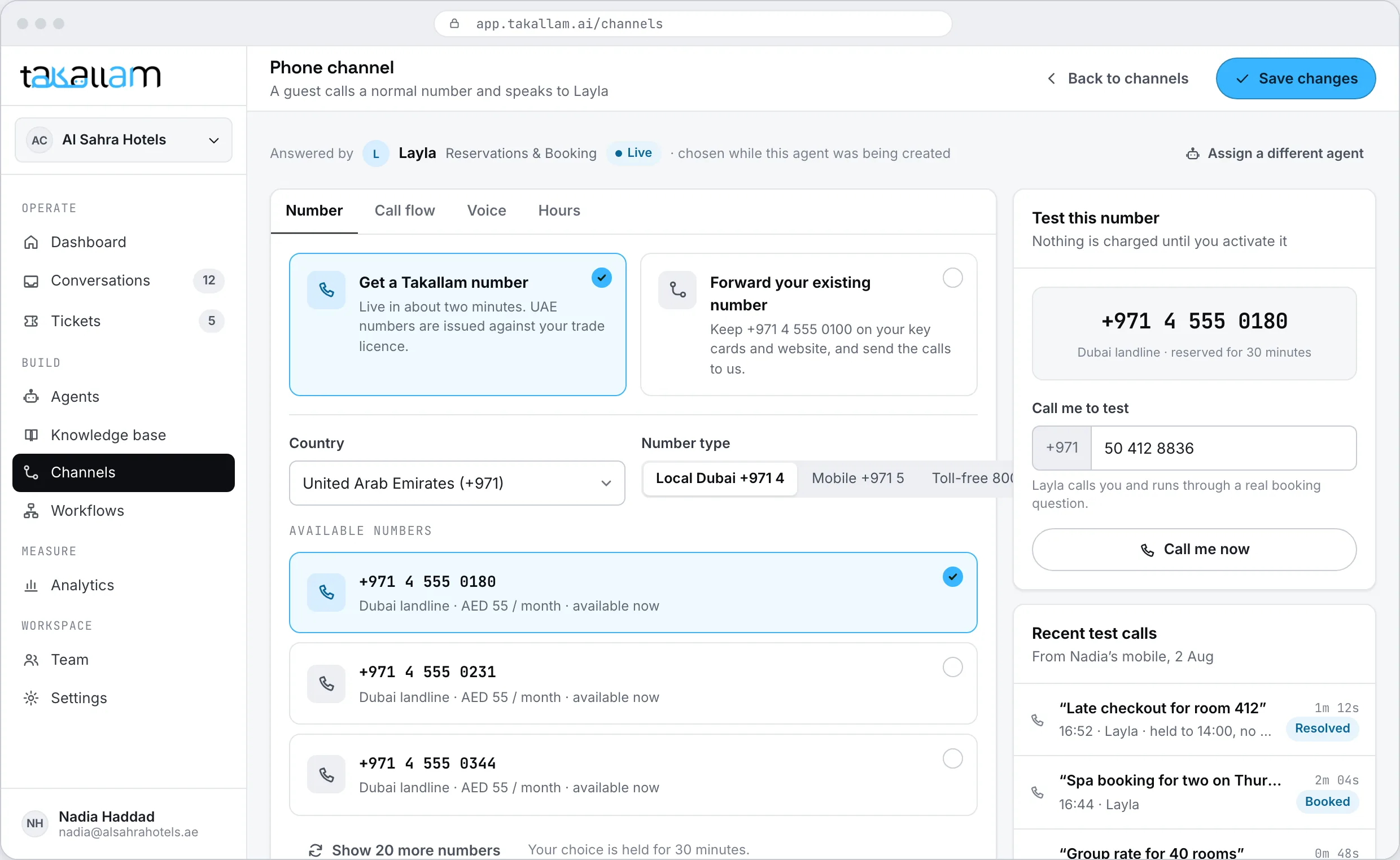
A number that answers on the first ring
Take a new number or point your existing one at Takallam. The agent answers immediately, in Arabic or English, however many people call at once. At 3am it behaves exactly the way it does at 3pm.
- No hold queue, because there is nothing to queue behind.
- Transfers to your team with the transcript already attached.
- After-hours behaviour you define, not a voicemail box nobody opens.
Where your team actually works
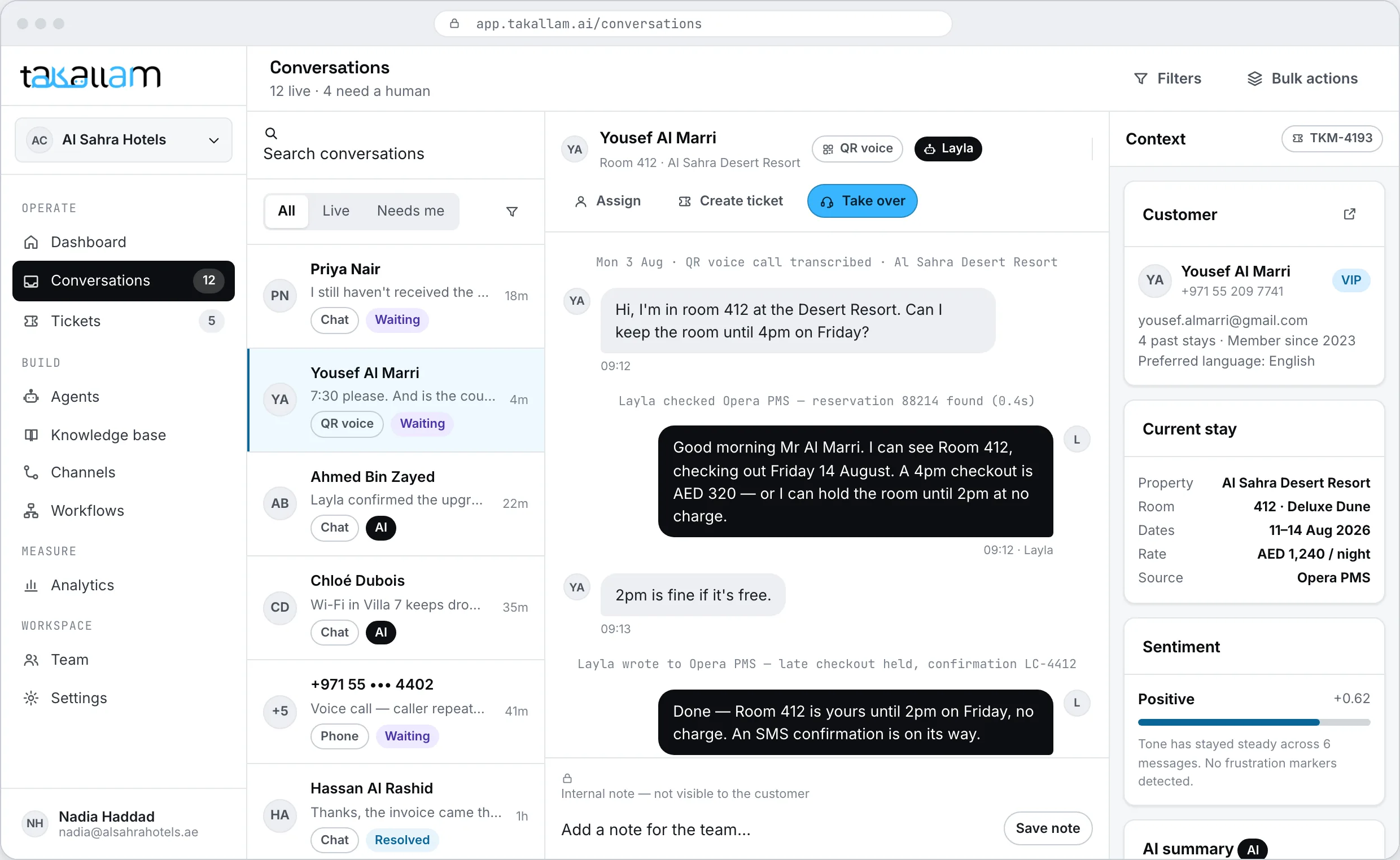
One inbox for all four channels. Open a conversation and you see the whole thing — what the customer asked, what the AI answered, which source it used, why it escalated. Take over and keep typing. The customer sees a continuation, not a transfer.
- Tickets and SLAs for the things that need tracking past the end of the conversation.
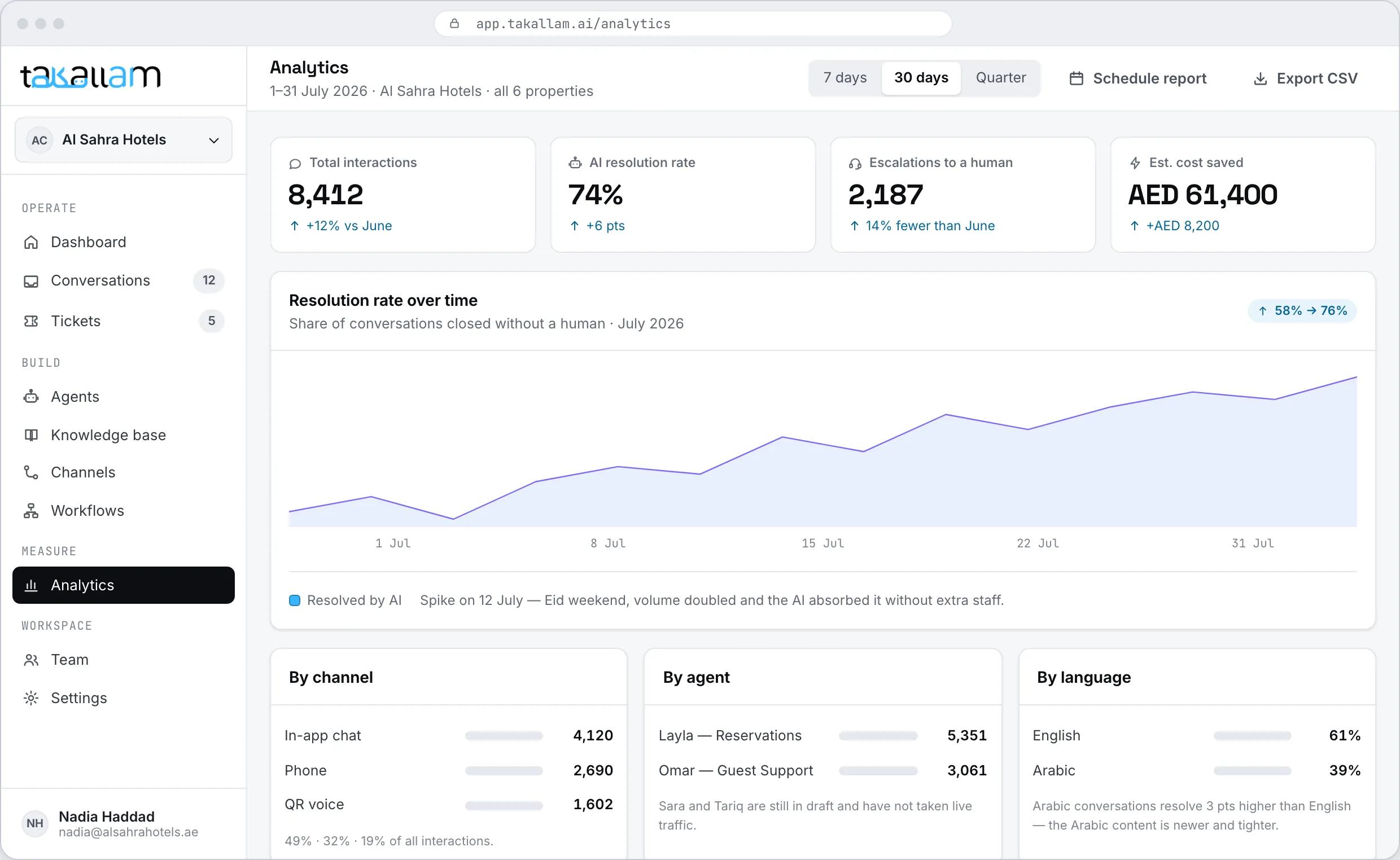
- Conversation analytics: what people ask, what gets resolved, where the agent gives up.
- Roles and permissions for your team, and one knowledge base everyone edits in the same place.
Everything that happens after the conversation ends
The agent decides what to say. A workflow decides what happens next. When a call is handled → summarise it → did it change a booking? → update the PMS and text the guest the new time. You build it by dragging blocks, not by filing a request with engineering.
- Triggers on a conversation closing, an escalation, a ticket changing state, or a schedule.
- Branches, conditions and merge fields, with a live preview of the message a real customer would receive.
- A run history that shows every step, what it returned, and exactly where it failed.
What comes with it
These describe what the platform includes. They are not performance figures — Takallam is pre-launch and has no published results.
You pay for interactions, not for chairs
Each channel is priced separately, because a five-minute phone call and a chat message do not cost the same to deliver. There are no per-seat licences, so putting your whole team in the console changes nothing on the bill. There is no minimum commitment.
- Per interaction, per channel — and the analytics show you exactly what each channel handled.
- Add colleagues to the console without adding to the invoice.
- Takallam is pre-launch, so rates are being set with the first cohort against real volume.
About getting it running
How long does it take to get an agent live?
Most businesses can have a first agent answering the same day. The automatic part — provisioning, crawling your website, building the knowledge base and drafting agents — takes minutes. The rest is you reviewing what it learned and deciding what the agent is allowed to do, which is the part worth spending time on.
Do we need a developer?
No. Onboarding, the knowledge base, the agent builder and all four channels are point-and-click. You only need a developer if you want the mobile SDK inside your own app, or if you want to drive Takallam from your own backend through the API.
What if our website does not have all the answers?
Then you add them. Upload PDFs, price lists and policy documents, write entries directly, or connect the system where the answer actually lives — a PMS, a booking system, an order database. The website crawl is a starting point, not the ceiling.
Can we run more than one agent?
Yes, and most businesses should. An agent is a role: reservations, billing, deliveries, the front desk. Each one gets its own knowledge, voice, actions and escalation rules, so the billing agent never answers with the room-service menu.
What happens when the agent gets something wrong?
It escalates to a person in the same conversation, with the transcript and the sources it used attached. You set the trigger — low confidence, a tone the agent reads as unhappy, a topic it is not allowed to touch. The customer does not repeat themselves and never sees a ticket number.
Do we have to use all four channels?
No. Turn on the ones you want and leave the rest off. Plenty of teams start with chat on the website or a QR code in one location, then add the support inbox and the phone line once they have watched the agent handle real questions.
Can it answer our support inbox as well?
Yes — email is a channel like the others, not a separate product. You forward your support address to Takallam or connect the mailbox, and the agent reads the whole thread, replies in-thread from your own address, and reads attachments. Anything it should not answer reaches your team with the full thread attached, and you can run it in draft mode until you trust it.
Can we keep our existing phone number?
Yes. Point an existing number at Takallam or take a new one. Either way, calls the agent cannot handle route to your team with the full conversation attached.
What does it cost?
You pay per interaction, priced separately for each channel. No per-seat licences and no minimum commitment. Takallam is pre-launch, so exact rates are being set with the first cohort — join the waitlist and we will quote against your actual volume.
See it on your own website
Give us your domain and the channels you care about. We will show you what Takallam builds from your site and what it would cost against your real volume.
Pay per interaction · priced per channel · no seats, no minimums