
What happens after the conversation
An agent decides what to say. A workflow decides what happens next — the confirmation the guest gets, the record that updates, the sheet that logs it. You build it by dragging blocks on a canvas, not by filing a request with engineering.
Answering the question is half the job
A guest calls at 11pm and moves their checkout to 2pm. The agent says yes. Now something has to change the booking in your PMS, send the guest a confirmation, and tell housekeeping. If none of that happens on its own, someone reads the transcript the next morning and does it by hand — which is the job you were trying to remove.
- Workflows run off what happened in the conversation, not off a form someone remembers to fill in.
- They run on every channel — a QR scan, a chat, an email, a phone call.
- Nothing to install: the trigger, the logic and the actions live in the same place as the agent.
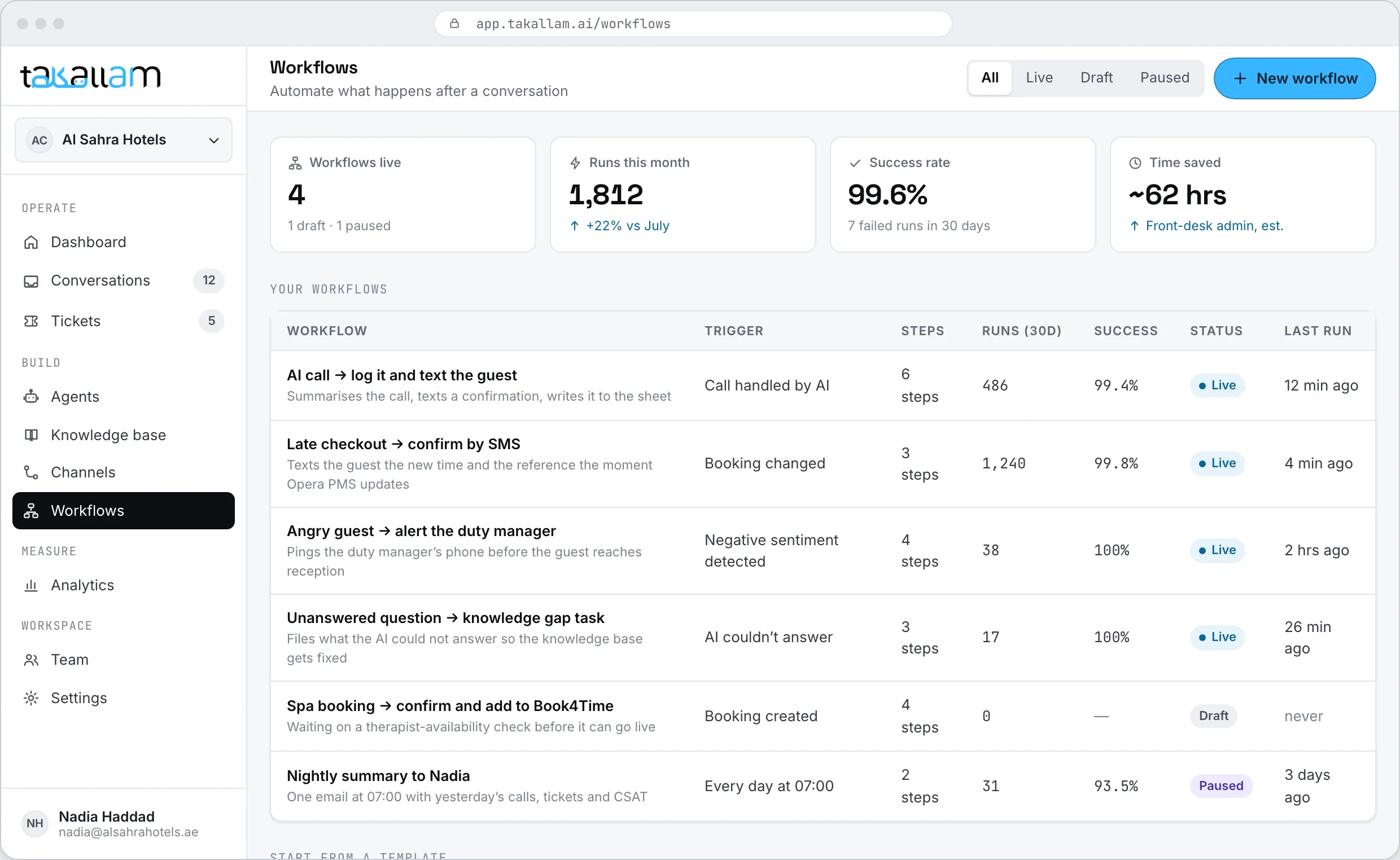
Three blocks, and that is the whole language
Every workflow has the same shape however complicated it gets. If you can describe the rule out loud, you can build it.
When
The trigger. A call is handled. A conversation is escalated. A ticket passes its SLA. A specific QR code is scanned. Pick one and the workflow starts there.
Then
The action. Summarise the conversation, send a message, update a record in another system, open a ticket, call an API of your own, wait, or put it in front of a person.
If
The condition. Did the call change a booking? Is the guest checking out today? Is it after midnight? Every If splits into branches, and each branch carries on by itself.
One workflow, from trigger to text message
This is the hotel version, and it is the one most teams build first. A guest calls, the AI handles it, and everything downstream happens without anyone touching a keyboard.
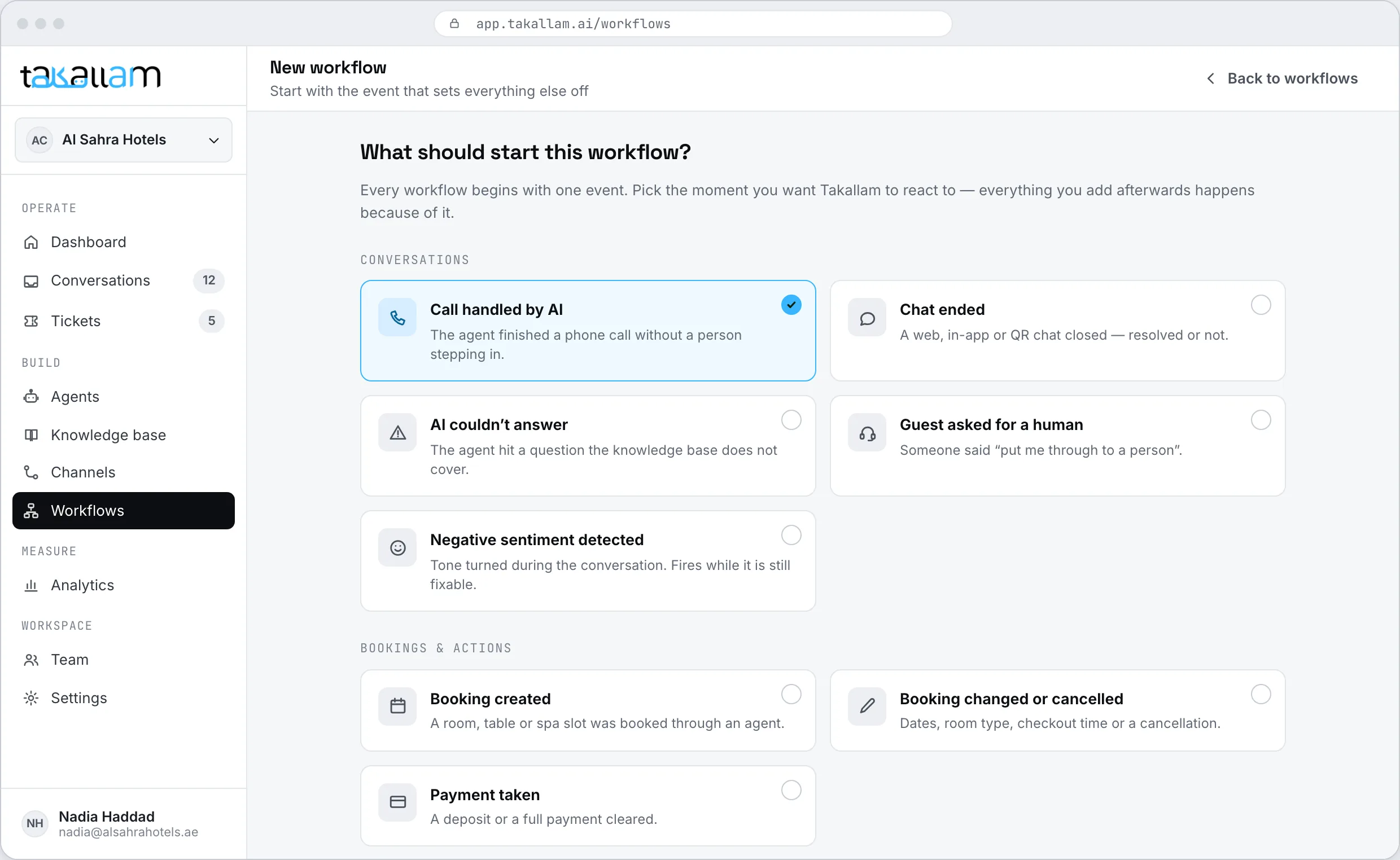
Start from the thing that happened
Open a new workflow and choose the trigger: when a call is handled by the AI. You can start from an empty canvas or from a pattern that is already wired up.
- Triggers cover conversations, escalations, tickets, schedules and inbound webhooks.
- The same workflow can run on one channel or all four.
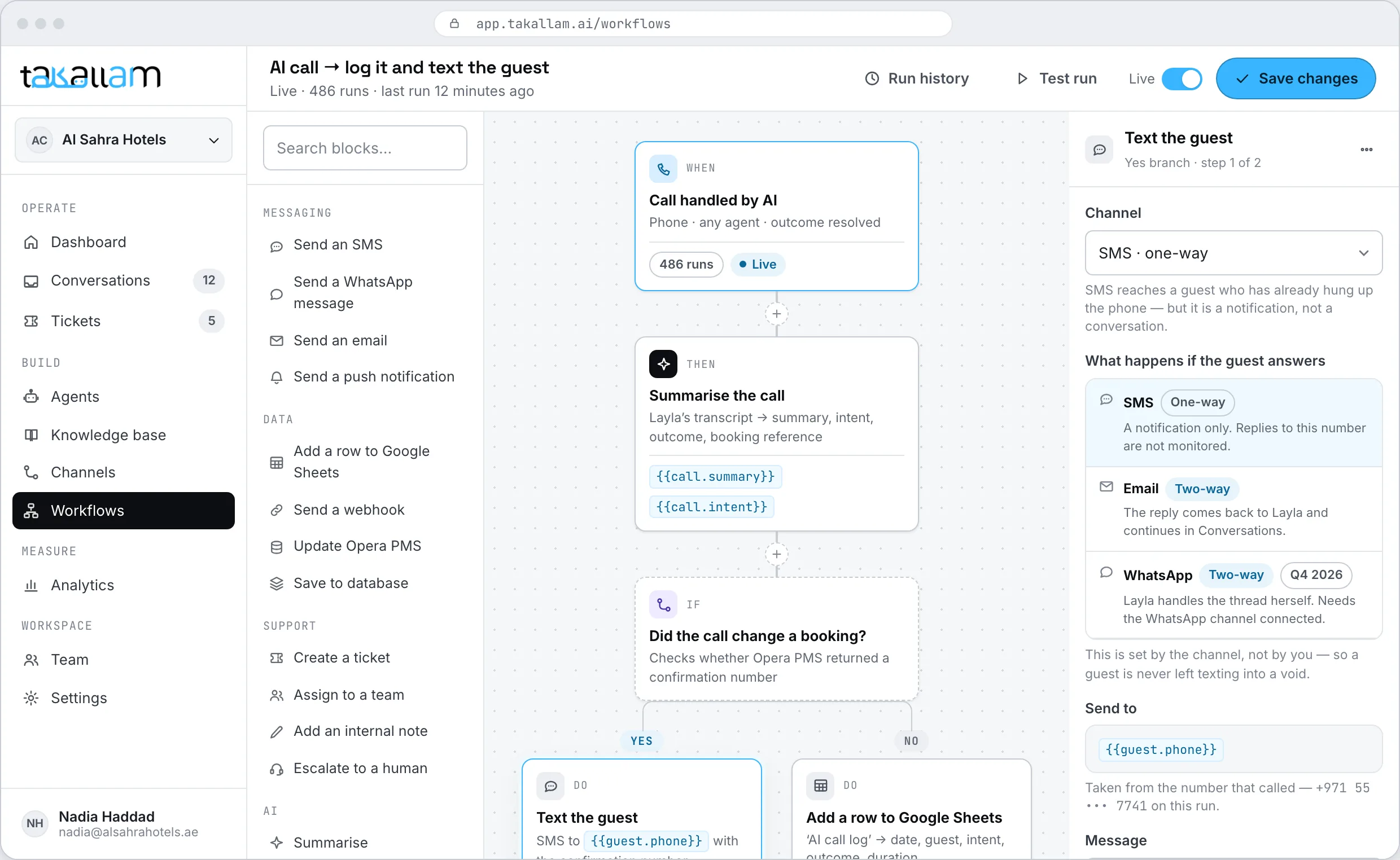
Chain the steps on the canvas
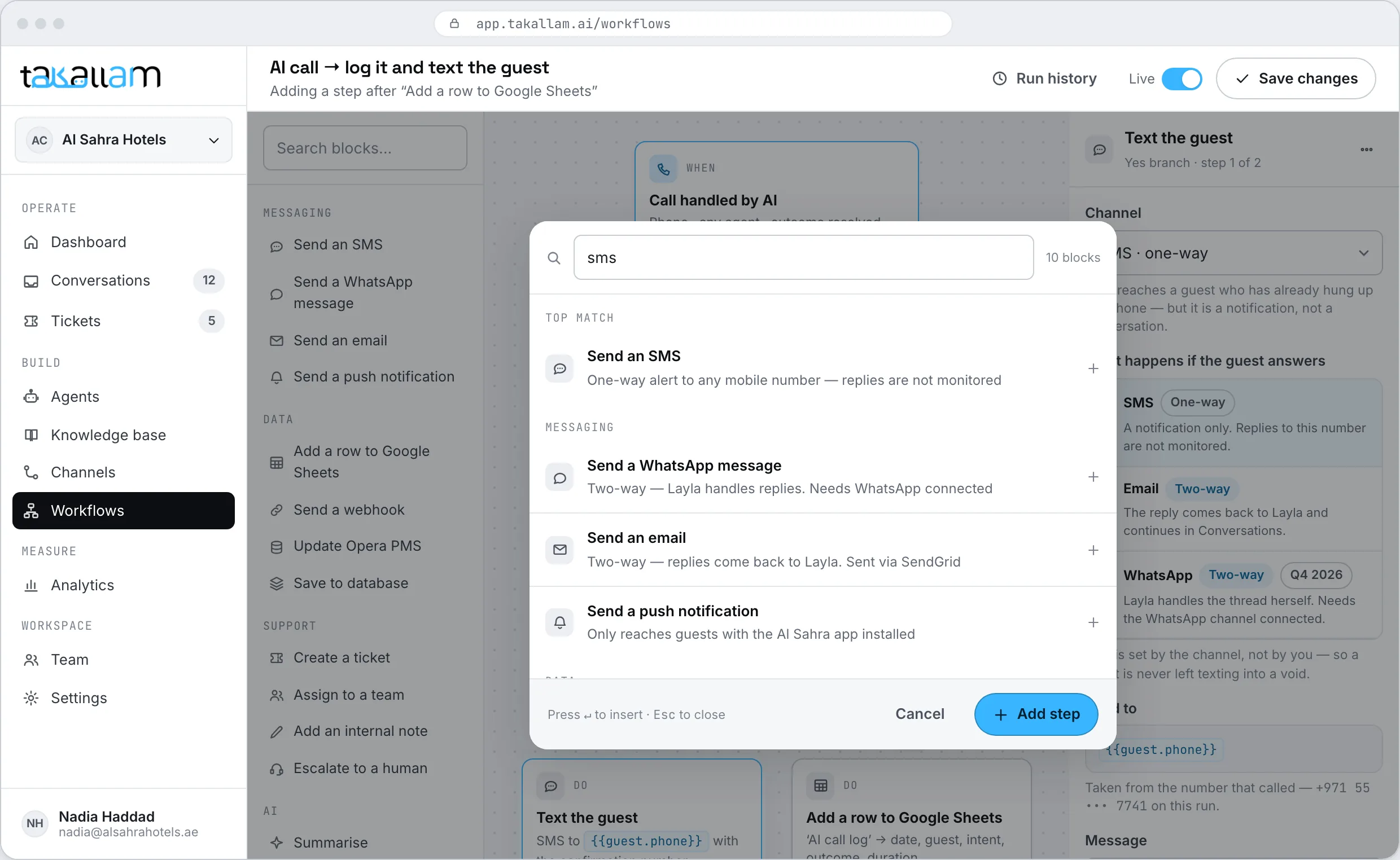
Drag a Then block: summarise the call. Drag an If block: did it change a booking? The canvas branches from there — one path for yes, one for no. Blocks snap together the way blocks on a Notion page do, and you can drag a whole branch somewhere else without breaking it.
- Yes: text the guest their confirmation number and update the PMS.
- No: log the call to a spreadsheet and stop.
- Zoom out to see the shape of the whole thing, or open one node and forget the rest.
Open a node and write the actual message
Every block opens into its own panel. Drop merge fields from the conversation into the text — guest name, room number, new checkout time, confirmation number — and watch the message a real customer would receive build itself beside you as you type.
- Merge fields come from the conversation, the customer record and earlier steps.
- The preview renders in Arabic and English, right-to-left included.
- Nothing goes out until you have seen it as the customer will.
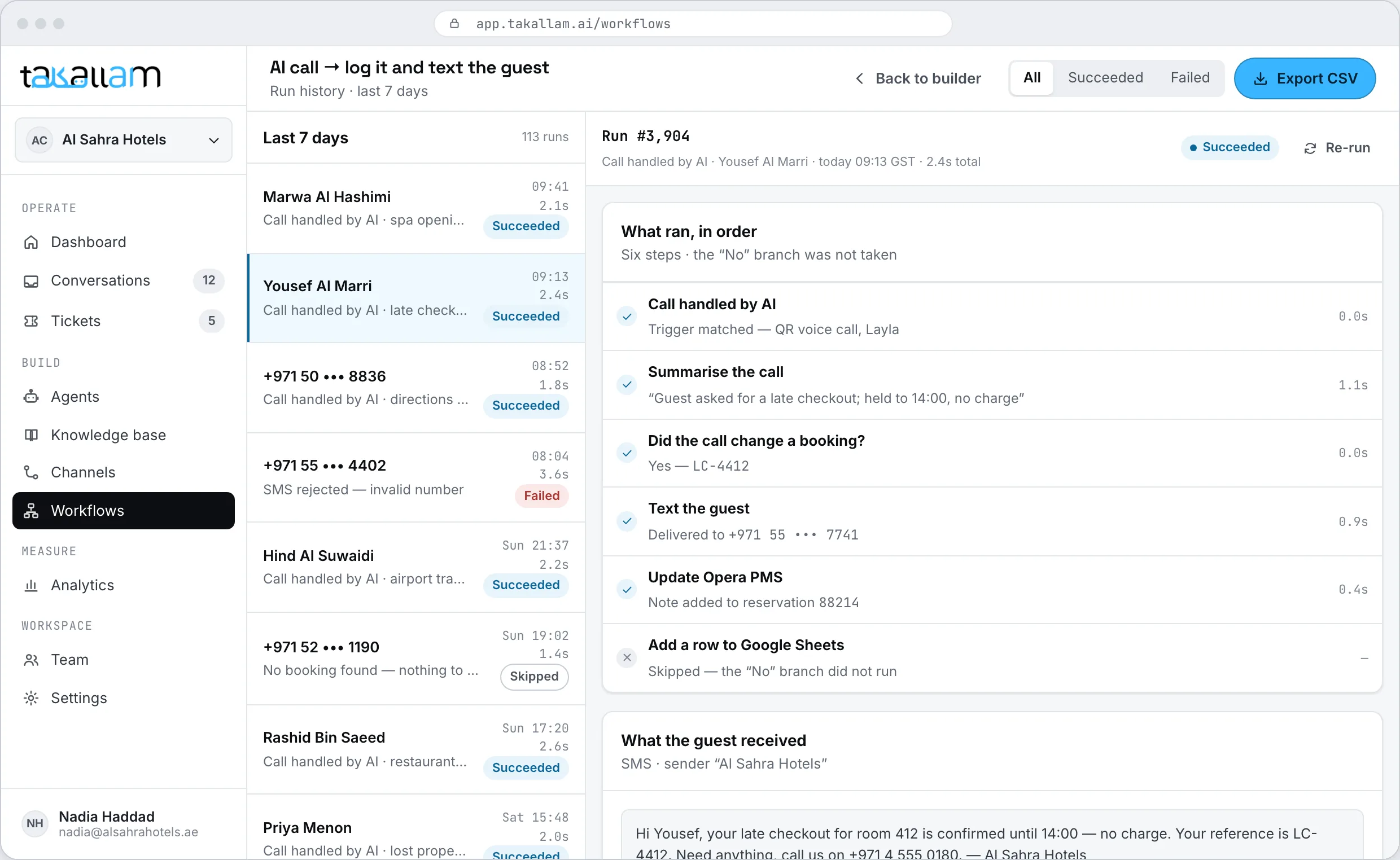
Did it actually work? Open the run.
Every execution is recorded step by step: what triggered it, what each block received, what it returned, how long it took, and where it stopped if it stopped. When a guest says the confirmation never arrived, you open that run instead of guessing.
- Per-step logs, not one green tick for the whole thing.
- Failed runs keep their inputs, so you can fix the branch and run it again.
- Filter by workflow, by trigger or by outcome.
- Every run links back to the conversation that started it.
Things that can start a workflow
What a step can do
Six kinds of block cover almost everything teams actually automate. The sixth one covers the rest.
Send a message
A text, an email, or a reply back into the same conversation. Written with merge fields and previewed before it goes anywhere.
Update another system
Push the change into a PMS, a CRM, an order system or a spreadsheet, so the record matches what the customer was told.
Open or close a ticket
Create a ticket with an owner and a due time, update one, or close the one a workflow just resolved.
See tickets and SLAsPut it in front of a person
Route it to the right teammate with the transcript attached, instead of hoping someone notices it in a queue.
Wait, then carry on
Hold for an hour, or until the morning, then continue down the branch. Useful for follow-ups that would be rude immediately.
Call your own API
Any HTTP endpoint you own, with the conversation data attached and the response usable by the next step.
Read the API referenceInstead of bolting an automation tool onto your support stack
The usual arrangement is a general automation tool wired to a helpdesk with webhooks. It works, right up until you need to know why one specific guest never got their message.
| Takallam workflows | Automation tool + helpdesk | Build it yourself | |
|---|---|---|---|
| Triggered by the conversation itself | Via webhook | ||
| Reads the transcript and the summary | |||
| Merge fields from the conversation | |||
| Live preview of the customer message | |||
| Per-step run logs in the same app | You build it | ||
| Works across QR, chat, email and voice | |||
| Built by an ops lead, not an engineer | |||
| No extra vendor and no extra bill |
Capability categories, not named products. General automation tools connect to far more third-party apps than Takallam does, and writing it yourself gives you total control — the difference here is how close the automation sits to the conversation.
Every workflow is also JSON
What you drag on the canvas has a shape you can write by hand. Create workflows from your own code, trigger them from your systems, and subscribe to a webhook when a run finishes.
- Create, update and version workflows through the REST API.
- Signed webhooks on every run, carrying per-step results.
- Trigger a workflow from an event in your own backend.
# The worked example above, created from code
curl https://api.takallam.ai/v1/workflows \
  -H "Authorization: Bearer $TAKALLAM_KEY" \
  -d '{
    "name": "Late checkout follow-up",
    "when": { "event": "call.handled" },
    "then": [
      { "step": "summarise" },
      {
        "step": "branch",
        "if": "booking_changed",
        "yes": [
          { "step": "send_sms", "template": "confirmation" },
          { "step": "update_pms" }
        ],
        "no": [
          { "step": "append_sheet", "sheet": "calls_log" }
        ]
      }
    ]
}'What people ask about workflows
What is a workflow in Takallam?
A workflow is what happens around a conversation. It starts from something that happened — a call was handled, a conversation was escalated, a QR code was scanned — and then runs the steps you laid out: summarise, check a condition, send a message, update another system, tell someone.
Do I need a developer to build one?
No. Workflows are built by dragging blocks on a canvas and filling in the panel that opens. Merge fields are picked from a list and the preview shows the message exactly as the customer will see it. A developer is only involved if you want a step to call an API of your own.
What can trigger a workflow?
Conversation events (a call handled, a chat ended, an email answered, an escalation), ticket events (opened, breached, closed), a specific QR code being scanned, a schedule you set, or an inbound webhook from your own systems.
Can a workflow update our PMS or CRM?
Yes, and that is the main reason they exist. A step can push the change into another system so the record matches what the customer was actually told. Where there is no native connection, a step can call any HTTP endpoint you own and use the response in the next step.
How do I know a workflow actually ran?
Run history records every execution step by step — what triggered it, what each block received and returned, how long it took, and where it stopped. When someone says a message never arrived, you open the run rather than reconstructing it from memory.
What happens when a step fails?
The run stops at the failed step and keeps its inputs, so you can see exactly what went in and what came back. Fix the branch and run it again. Failures show up in the run list instead of disappearing quietly.
Do workflows work in Arabic?
Yes. Templates and merge fields work in Arabic and English, right-to-left included, and the preview renders in the language the customer is actually using. If a caller spoke Emirati Arabic, the follow-up message can go out in Arabic.
Is the workflow builder a separate product?
No. It is part of the platform rather than a separate licence. You pay per interaction, each channel is priced separately, and there are no seats and no minimum commitment.
Bring the thing your team does by hand after every call
Tell us what happens after a conversation ends in your business, and we will build that workflow with you on your own knowledge base during onboarding.
Pay per interaction, priced separately for each channel. No seats, no minimums.